Intake sources and document preparation
The intake layer receives files before OCR. It is responsible for source identity, routing, preparation, security checks, duplicate detection, and retry control.
Supported intake channels
eDocify is designed to accept documents from many operational channels, not only from a browser upload button. Every source should create the same normalized intake item: source identity, tenant/client/company context, original file reference, delivery metadata, preparation state, OCR route, audit trail, and retry state.
| Channel | Typical use | Status model |
|---|---|---|
| Portal upload | Manual upload by accountant, client, verifier, or admin | Immediate batch queue. |
| Client inbox | Per-client email alias such as invoices+client@domain | Delivery log, attachment extraction, bounce handling. |
| IMAP / Graph Mail | Customer mailbox integration | Sync state, retry, token health. |
| Google Drive | Shared folder import | Folder route and incremental sync. |
| Microsoft Graph Drive | OneDrive / Teams document import | Tenant app credentials and folder route. |
| SharePoint | Enterprise document library import | Site, library, folder, and permissions. |
| API push | System-to-system upload | API key, idempotency key, rate limit. |
| Manual import | Admin or operator action | Direct queue insertion. |
| Planned SFTP / scanner input | Enterprise batch scanning | Schedule, folder policy, file naming rules. |
Source catalog
| Source family | Examples | Typical file types | Best fit | Required controls |
|---|---|---|---|---|
| Browser portal upload | Upload document, batch upload, quick recognition upload | PDF, TIFF, JPG, PNG, ZIP, EML/MSG attachments | Accounting users, clients, verifier operators | Client/company selection, document type, OCR/AI profile, tags, batch policy, size/page limits. |
| Client-specific email inboxes | invoices+client@edocify.com, ap.client@company.com | Email body, PDF, images, ZIP, XML, EML/MSG attachments | Accounting firms and AP teams receiving documents from many customers | Alias ownership, sender allow/deny list, delivery log, bounce log, attachment extraction, duplicate detection, malware scan. |
| Shared mailboxes | Microsoft 365 shared mailbox, Gmail/Google Workspace mailbox, IMAP mailbox | Email messages and attachments | Customers that already collect invoices in one mailbox | OAuth/token health, folder routing, sync checkpoint, retry, mailbox throttling visibility. |
| Google Drive | My Drive, Shared Drive folders | PDF, images, Office files, ZIP | Customers who drop supplier invoices into Drive folders | Folder route, incremental sync, moved/deleted file handling, permissions audit, connector health. |
| Microsoft OneDrive / Teams files | Graph Drive, Teams channel files | PDF, images, Office files, ZIP | Teams-based AP and operations workflows | Tenant app credentials, folder route, delta sync, permissions audit, token rotation. |
| SharePoint document libraries | Site/library/folder import | PDF, images, Office files, ZIP | Enterprise document libraries and departmental archives | Site/library configuration, folder routing, retention hints, permission scope, connector SLA. |
| Public API push | Customer system uploads through eDocify API | Binary files, base64 payload, JSON metadata | ERP, CRM, supplier portal, custom application integration | API key, idempotency key, rate limits, webhook callback, request audit, sandbox keys. |
| Webhooks / event-driven connectors | External system notifies that a document is ready | URL reference, JSON metadata, file download | High-volume integrations where files are stored elsewhere | Signature validation, fetch retry, source checksum, dead-letter on failed download. |
| SFTP / FTPS / FTP drop folders | /invoices/client-a/incoming | PDF, images, ZIP, CSV manifest | Enterprise batch integrations and scanner outputs | Schedule, credentials, host key validation, processed/error folders, file naming rules. |
| Network scanner / MFP hot folder | Scan-to-folder, scan-to-mail, scan-to-SFTP | PDF, TIFF, JPG | Paper-heavy customers and document factories | Barcode/separator page support, image cleanup, split/merge review, scanner station identity. |
| Local or network folder agent | Windows service, Linux agent, SMB/UNC path | PDF, images, ZIP | On-premise file shares and legacy capture flows | Agent registration, folder policy, offline queue, checksum, service health. |
| Object storage | Azure Blob Storage, Amazon S3, S3-compatible storage | Any supported document file | High-volume enterprise staging and archive migration | Container/bucket route, managed identity/keys, lifecycle policy, object metadata mapping. |
| ERP / accounting system import | Rivile, Business Central, SAP, NetSuite, Finvalda, custom ERP | Invoice PDFs, XML, export evidence files | Customers who already keep source files in ERP-related workflows | ERP profile, company mapping, vendor/customer lookup, export correlation id. |
| E-invoice and structured documents | Peppol BIS, XML invoice, UBL, EDI, national e-invoice formats | XML, JSON, EDI, PDF+XML packages | Low-OCR routes where structured data is already available | Schema validation, attachment linking, supplier validation, fallback to OCR for PDF-only parts. |
| Archive migration import | Legacy archive export, CSV/XLSX manifest with file paths | PDF, images, Office files, ZIP, CSV/XLSX manifest | E-document Archive onboarding and historical migration | Manifest validation, retention class, legal hold flags, checksum, chain-of-custody import log. |
| Mobile app capture | Phone camera scan, mobile upload, mobile approval attachment | PDF, JPG, PNG | Field workers, drivers, receipt capture, approval evidence | User/device identity, image quality gate, GPS/device metadata policy, offline upload queue. |
The same source catalog can be filtered per product:
| Product | Most important sources |
|---|---|
| Accounting Workspace | Portal upload, client inboxes, shared mailboxes, Google Drive, SharePoint, API push, scanner/SFTP input, ERP-related imports. |
| Enterprise IDP / OCR Operations | Batch upload, SFTP, scanner hot folders, object storage, API push, SharePoint, Drive, archive migration packages. |
| E-document Archive | Portal archive import, archive API, object storage, SharePoint libraries, legacy archive migration manifests, ERP evidence packages. |
Intake item lifecycle
stateDiagram-v2
  [*] --> Received
  Received --> Preparing
  Preparing --> QueuedForOcr
  Preparing --> NeedsManualPreparation
  QueuedForOcr --> Processing
  Processing --> NeedsVerification
  Processing --> Failed
  Failed --> Retry
  Retry --> QueuedForOcr
  NeedsManualPreparation --> QueuedForOcr
Document preparation
Preparation happens before OCR when the file needs cleanup or structural decisions:
- split one PDF into multiple documents;
- merge related files into one document;
- rotate pages;
- deskew scans and stop uncertain image cleanup cases for manual review;
- detect attachments;
- extract embedded email attachments;
- identify duplicate files by hash;
- classify document type;
- preserve original file and normalized processing file.
For ABBYY-style batch processing, eDocify should support both automatic decisions and human confirmation when confidence is not high enough.
Batch upload and ZIP handling
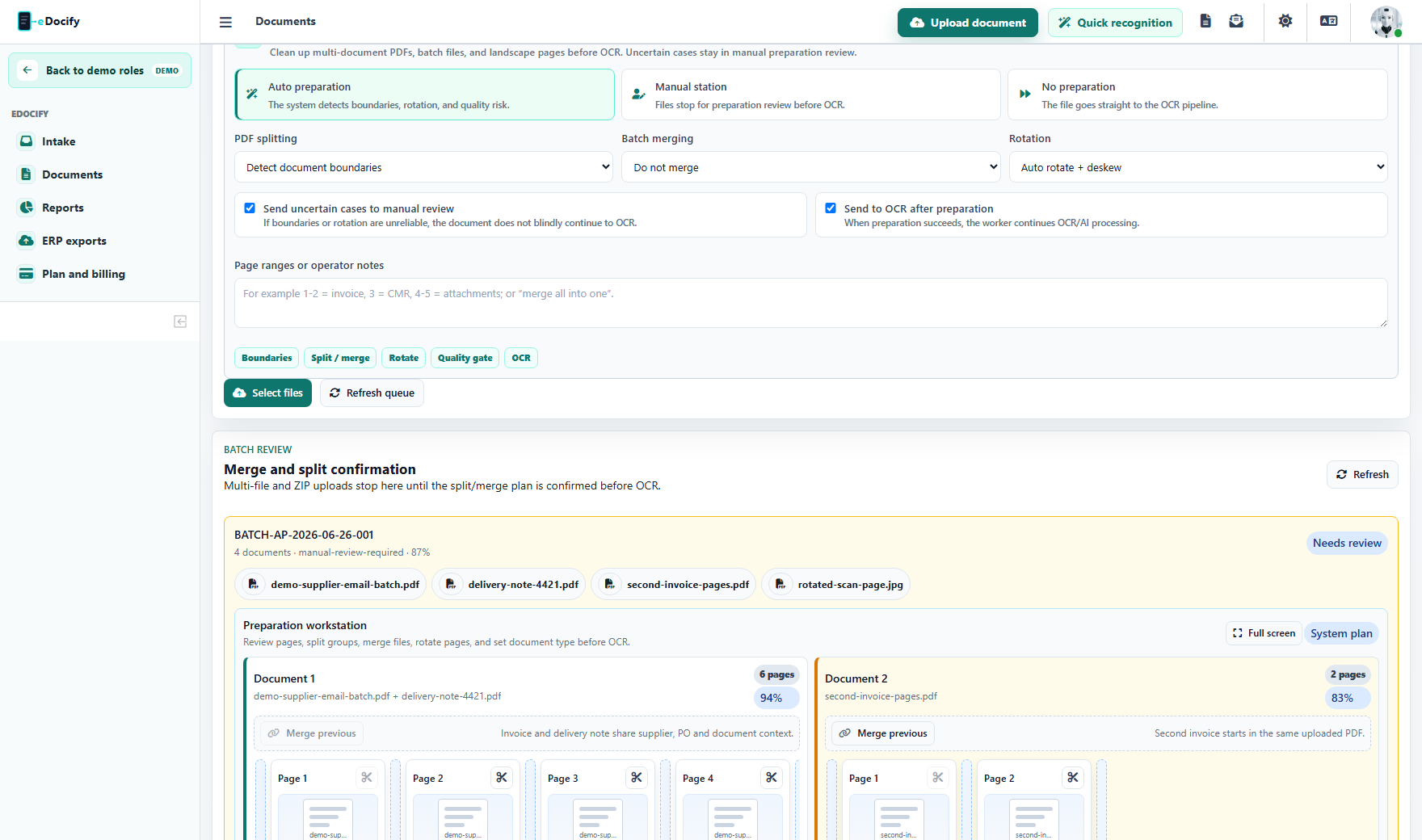
Portal upload is not limited to one document at a time. A user can upload a batch of PDFs, images, email attachments, or ZIP packages. The batch is assigned metadata once: client, source, document type, language, OCR/AI profile, tags, and notes. The intake layer then decides whether the batch can continue directly to OCR or must stop in preparation review.
Batch intake supports these patterns:
- one file equals one document;
- one PDF contains multiple invoices and must be split before OCR;
- several uploaded files belong to one business document and must be merged;
- ZIP or email attachments contain mixed invoices, delivery notes, and supporting files;
- landscape scans need auto-rotate or deskew before OCR;
- low-confidence split or merge decisions require a human confirmation.
Split, merge, and image cleanup rules
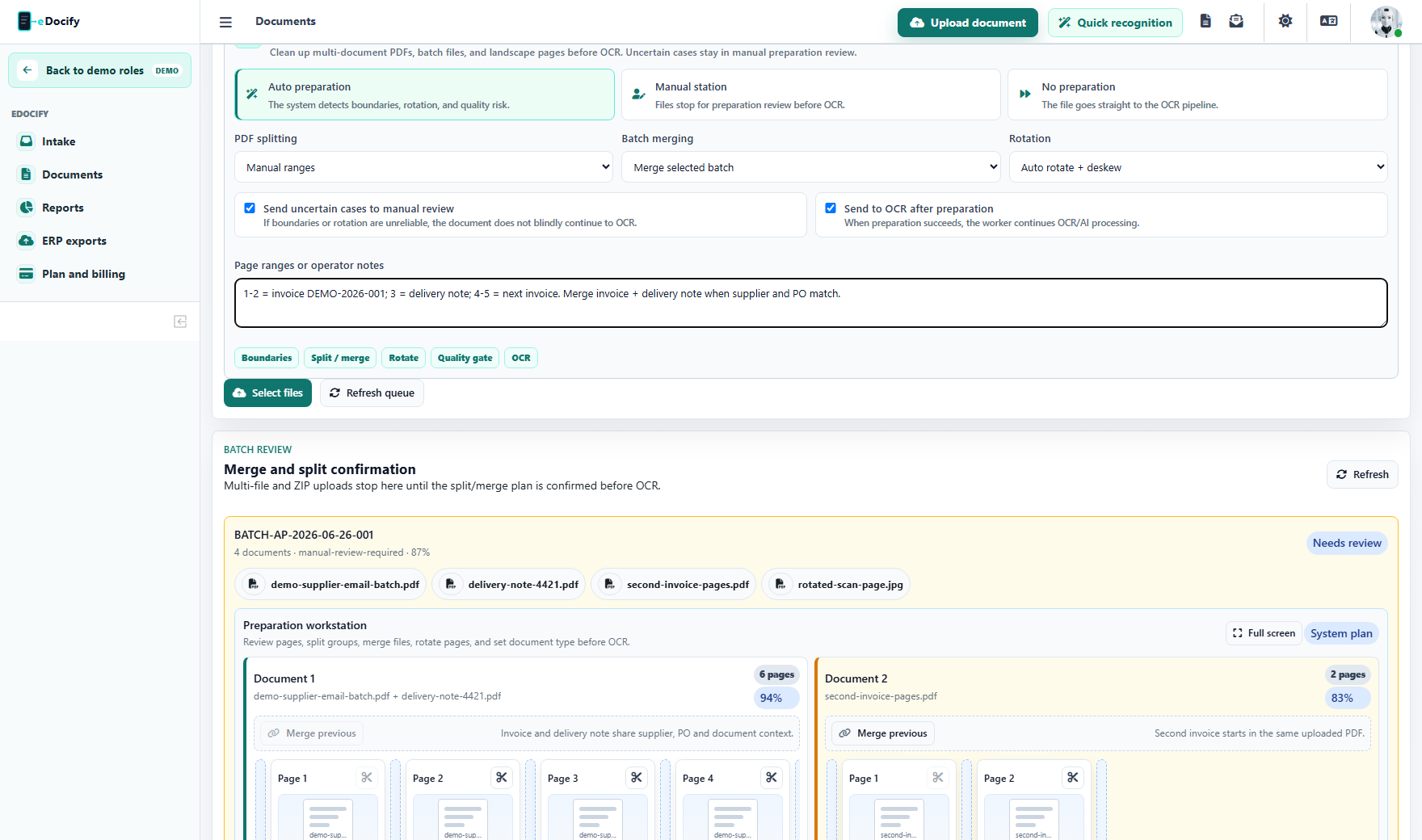
The preparation policy controls how the worker treats a batch:
| Control | What it does |
|---|---|
| PDF splitting | Detects document boundaries, separator pages, fixed page groups, or manual page ranges. |
| Batch merging | Combines selected files or files that belong to the same client/source/document key. |
| Rotation | Auto-rotates and deskews scans before OCR, or applies a forced rotation when configured. |
| Manual review | Stops uncertain cases before OCR so a user can confirm the plan. |
| Send to OCR | Releases prepared documents to the OCR/AI worker only after preparation succeeds. |
Current image cleanup is focused on auto-rotate, deskew, and quality gate decisions. If a scan has uncertain edges or needs manual cropping, the preparation layer should hold it for manual review rather than sending a bad image into OCR.
Preparation review
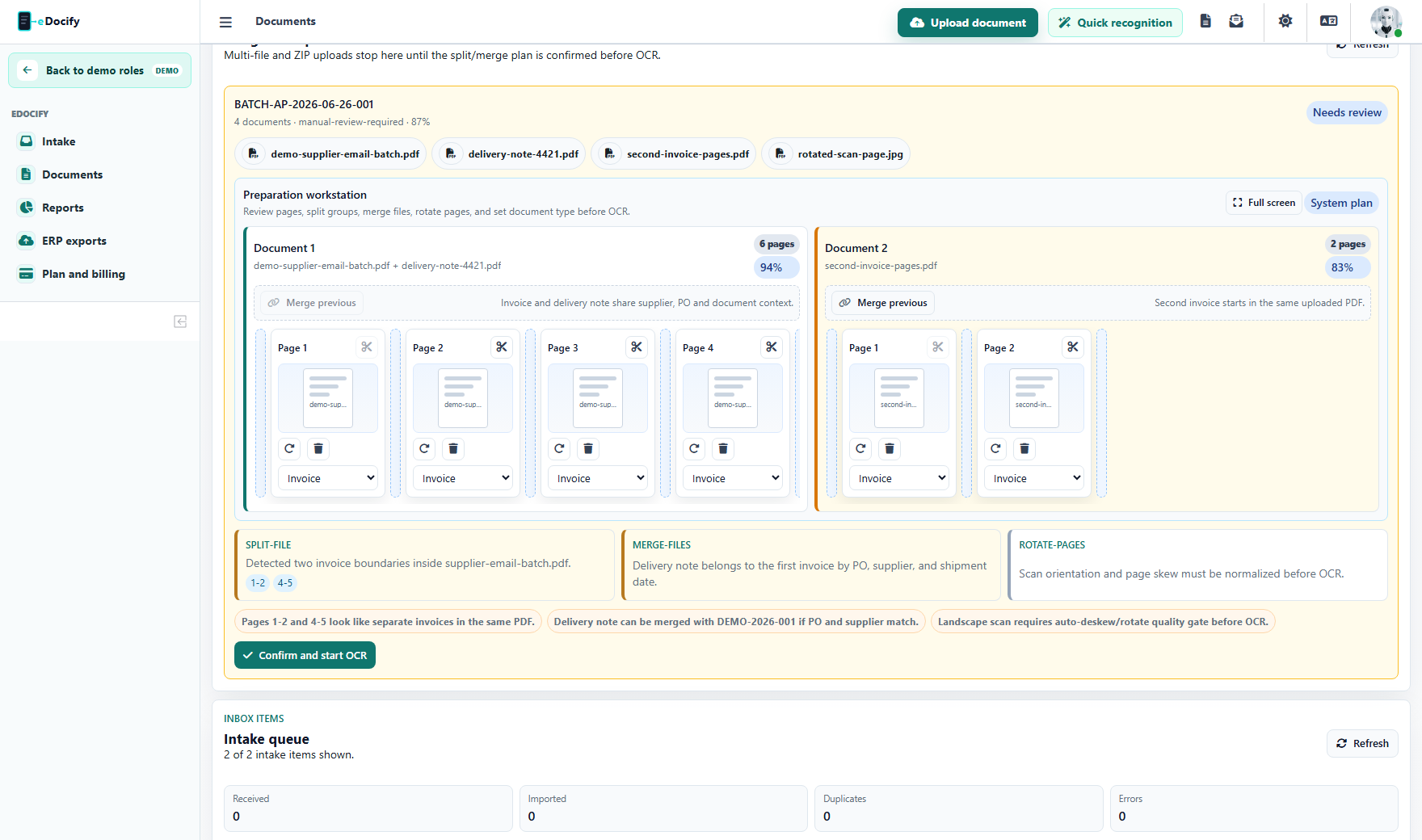
Preparation review is the control point before OCR. It shows:
- all files in the batch;
- detected document groups;
- split recommendations with page ranges;
- merge recommendations with reason and confidence;
- scan rotation or deskew actions;
- warnings that explain why the batch is held;
- a single confirmation action that releases prepared documents to OCR.
This is important for accounting firms and document factories because one customer email often contains several invoices, delivery notes, and supporting files in one message. Sending the batch directly to OCR without preparation would create duplicate work and poor extraction results.
Manual Preparation Workbench
When the automatic plan is not enough, eDocify exposes a page-level workbench. It is inspired by professional capture tools: every prepared document is shown as a lane, and every source page is shown as a draggable card.
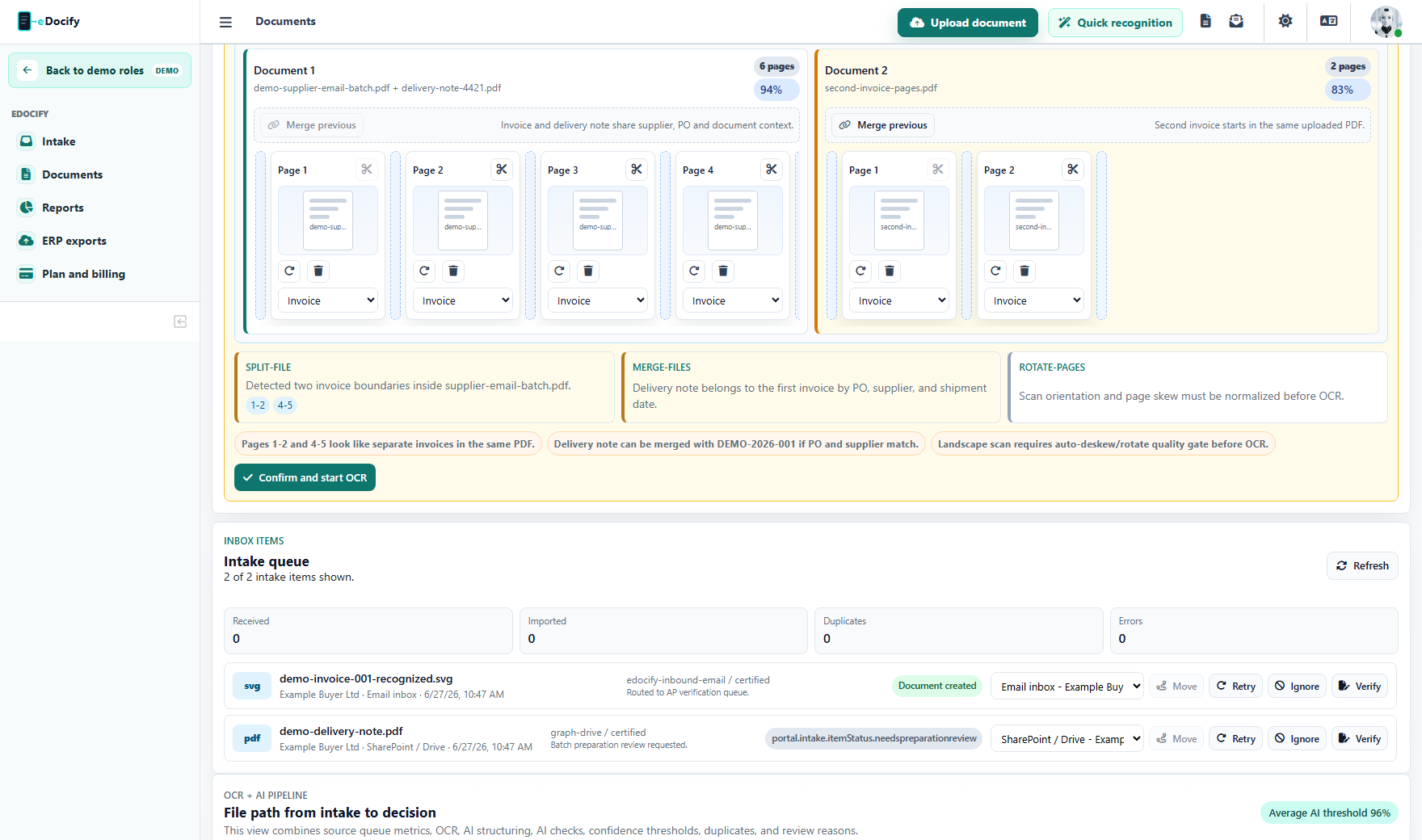
The operator can:
- drag pages between prepared documents;
- split before a selected page;
- merge a document lane with the previous one;
- rotate individual pages;
- remove unwanted pages;
- set page type such as invoice, receipt, logistics document, attachment, or auto;
- confirm the final plan and release the prepared PDFs to OCR.
The confirmation is not only a UI note. The browser sends a structured manual plan to the backend. The backend composes new prepared PDFs from the selected source pages, applies page rotation, preserves the original files, marks replaced originals as superseded, and queues the prepared outputs for OCR when the user confirms release.
For the full module description, see Document Preparation Workbench.
Routing decisions
Routing can use:
- tenant;
- client group;
- company;
- source;
- inbox alias;
- file name pattern;
- sender email;
- document type;
- extracted supplier;
- amount threshold;
- language;
- selected product profile.
Routing determines OCR/AI profile, verification queue, approval policy, archive retention, and ERP export profile.
Connector health center
Enterprise customers need visibility into connector reliability. A connector health dashboard should show:
- last successful sync;
- last error and incident timeline;
- affected client or company;
- source latency;
- imported document count;
- retry count;
- token expiration;
- SLA status;
- connector version;
- fallback or simulated mode warning.
Security checks
Recommended intake security pipeline:
- MIME validation;
- file extension validation;
- maximum size and page count limits;
- malware scan;
- encrypted PDF detection;
- PII classification;
- retention classification;
- audit event for every received file;
- quarantine state for suspicious files.
Operational recommendations
- Keep demo connectors visibly separated from production connectors.
- Do not silently fall back to simulated adapters in production.
- Use per-tenant aliases and routing rules for client inboxes.
- Require idempotency keys for API upload.
- Preserve raw file, normalized file, OCR text, and processing state separately.
- Expose failed intake items with retry, ignore, and reroute actions.