Screen, role, and action reference
This page is the product coverage map for eDocify documentation. It answers five practical questions:
- which product owns the screen;
- which role should see it;
- which menu item opens it;
- which tabs and buttons exist there;
- what must be documented and regression-tested when the screen changes.
The screenshots referenced here are captured from the local eDocify app in English product-scoped demo sessions. They are stored under /img/edocify/role-workspaces/.
Products
| Product | Main users | Main workspace goal |
|---|---|---|
| Accounting Workspace | Accountants, AP teams, accounting service firms | Receive invoices, verify accounting data, approve, and export to ERP. |
| Enterprise IDP / OCR Operations | Document factory teams, verifiers, BPO operators | Run high-volume OCR, verification, provider quality, and exception handling. |
| E-document Archive | Records managers, archivists, auditors, viewers | Preserve, search, govern, and evidence documents after business processing. |
Role catalog
| Role | Product scope | Responsibility |
|---|---|---|
| System admin | Platform and sandbox | Full configuration, users, product scope, security, billing, and emergency administration. |
| Tenant admin | Client group | Manages tenant group settings, companies, roles, policies, and product availability. |
| Client admin | Company or client | Manages client-level fields, lists, approval rules, and user assignment. |
| Integration admin | Product and client group | Owns inboxes, Drive, SharePoint, API, ERP routes, webhooks, retries, and connector health. |
| AI learning user | Internal AI governance | Curates samples, golden datasets, release gates, provider benchmarks, and local OCR learning. |
| Accountant | Accounting Workspace | Uploads, reviews, filters, prepares, and exports accounting documents. |
| Verifier | Accounting and IDP | Corrects OCR/AI headers, line items, regions, validations, and QA exceptions. |
| Approver | Accounting and IDP | Approves or rejects document-level and line-level approval tasks. |
| Finance director | Accounting and IDP | Handles high-value approvals, risk exceptions, and finance escalation views. |
| Auditor | All products where granted | Reviews audit trail, quality evidence, reports, archive evidence, and process history. |
| Viewer | Archive and read-only scopes | Searches and opens allowed documents without changing operational data. |
Product and menu matrix
| Menu item | Products | Typical roles | What it documents |
|---|---|---|---|
| Overview / Portal | Accounting, IDP, Archive | Admin, tenant admin, integration admin | Product profile, KPIs, workflow summary, product boundaries. |
| Accounting setup | Accounting | System admin, tenant admin, client admin, integration admin | Company, intake, OCR, lists, field rules, ERP setup, setup modes. |
| Intake | Accounting, IDP | Admin, accountant, client admin | Portal upload, source sync, intake item queue, retry, ignore, reroute, preparation. |
| Documents | Accounting, IDP | Accountant, verifier, approver, auditor, viewer | Document list, saved views, filters, bulk actions, document card, statuses. |
| Verification | Accounting, IDP | Verifier, admin | Professional workbench, locks, field editing, lines, region OCR, focus mode. |
| E-document archive | Archive | Archivist, records manager, auditor, viewer, admin | Archive search, record detail, retention, legal hold, evidence package. |
| Clients | All admin scopes | System admin, tenant admin, client admin | Client profiles, document fields, product access, company configuration. |
| Lists | All admin scopes | Admin, integration admin, client admin | Reference lists, CSV/API/Rivile/SQL/Bank of Lithuania sync, lookup bindings. |
| Field rules | Accounting, IDP | Admin, client admin | Field Processing Studio, normalization, validation, rule tests, publish/rollback. |
| Hierarchy | All admin scopes | Admin, tenant admin, client admin | Company tree, user assignment, delegations, approval governance. |
| Integrations | All product scopes | Integration admin, admin | Connectors, inboxes, Drive, SharePoint, API, health, retries, source routing. |
| ERP exports | Accounting, IDP | Integration admin, accountant, admin | ERP profiles, dry-run, mapping repair, export jobs, retry, cancel. |
| Reports | All products | Admin, accountant, verifier, auditor, finance director | Product-specific KPIs, exceptions, performance, quality, archive reports. |
| Audit | All products | Auditor, admin | Filtered event log, evidence, IP/user context, queue, document, export, demo events. |
| Plan and billing | Product account scopes | Admin, finance director, integration admin | Subscription, plan, payment methods, invoices, usage and billing actions. |
| Mobile app | Accounting, IDP | Admin | Mobile capture setup, push notifications, mobile intake direction. |
| AI Learning | IDP/internal | AI learning user, system admin | Samples, golden data, benchmarks, release gates, local OCR learning. |
| Quality guarantee | IDP/internal/accounting governance | Auditor, AI learning user, system admin | Accuracy targets, SLA, QA sampling, provider regression. |
Top bar actions
These actions appear across several product workspaces and should be documented as global behavior:
| Action | Expected behavior |
|---|---|
| Upload document | Opens product-appropriate intake. Accounting and IDP use batch intake; Archive uses archive import. |
| Quick recognition | Opens interactive OCR/verification flow for one document. |
| Product profile switch | Changes the visible product scope only when the role is allowed to access more than one product. |
| Language selector | Switches UI language without leaving the current workflow. |
| Notifications | Shows operational notifications, approvals, failed jobs, and user-specific alerts. |
| Settings | Opens allowed settings for the current role, not global settings for normal users. |
| Back to demo roles | In demo sessions, returns to the product and role picker without leaking another sandbox. |
Accounting Workspace action coverage
Accounting setup
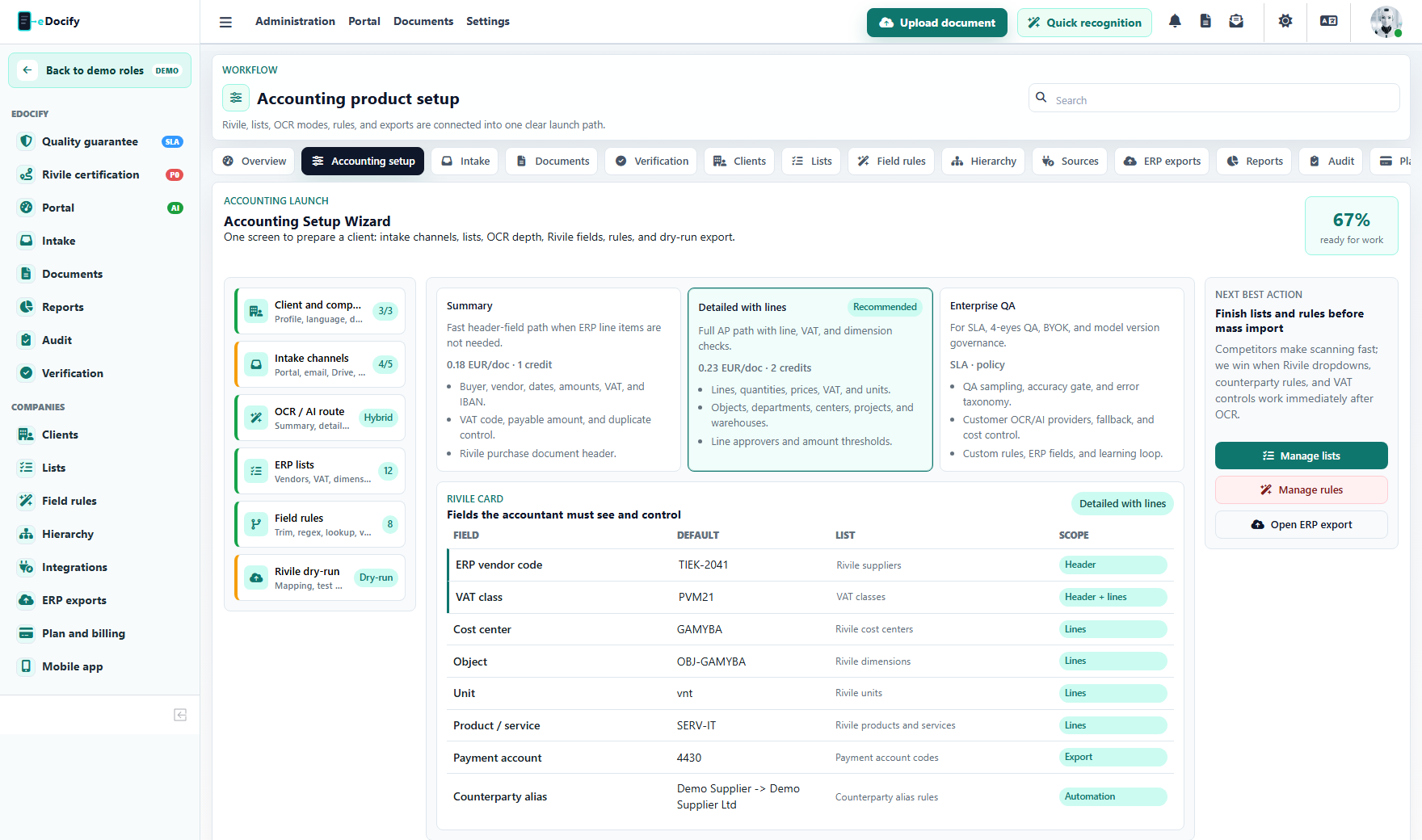
Setup has three operator modes:
| Mode | Use |
|---|---|
| Summary | Fast pilot setup for small teams. |
| Detailed | Normal customer onboarding with all relevant configuration visible. |
| Enterprise | Larger organization setup with approval, hierarchy, integration, and governance details. |
Setup steps that must be documented:
- company profile;
- intake sources;
- OCR/AI profile;
- lists and lookup dictionaries;
- field processing rules;
- ERP profile and dry-run readiness.
Intake and preparation
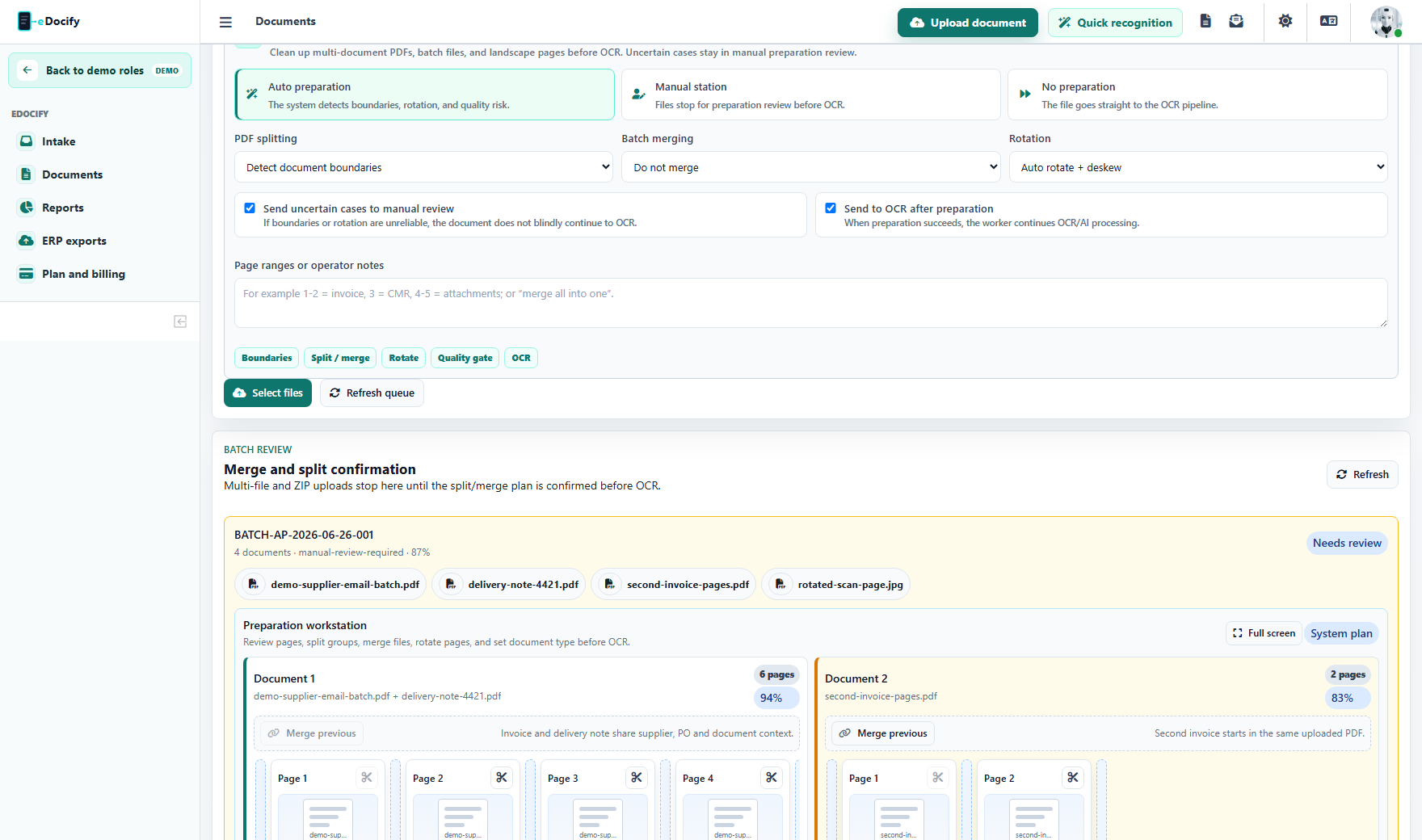
Intake actions:
| Action | Expected result |
|---|---|
| Upload files | Adds one or many files to a batch with metadata, tags, and routing options. |
| Refresh queue | Reloads intake items and source synchronization status. |
| Source sync | Runs the selected inbox, Drive, SharePoint, API, or archive import connector. |
| Retry item | Requeues a failed intake item. |
| Ignore item | Keeps the audit trail but removes the item from active work. |
| Reroute item | Changes client, source, document type, or target flow. |
| Open workbench | Opens split, merge, rotate, and manual preparation before OCR. |
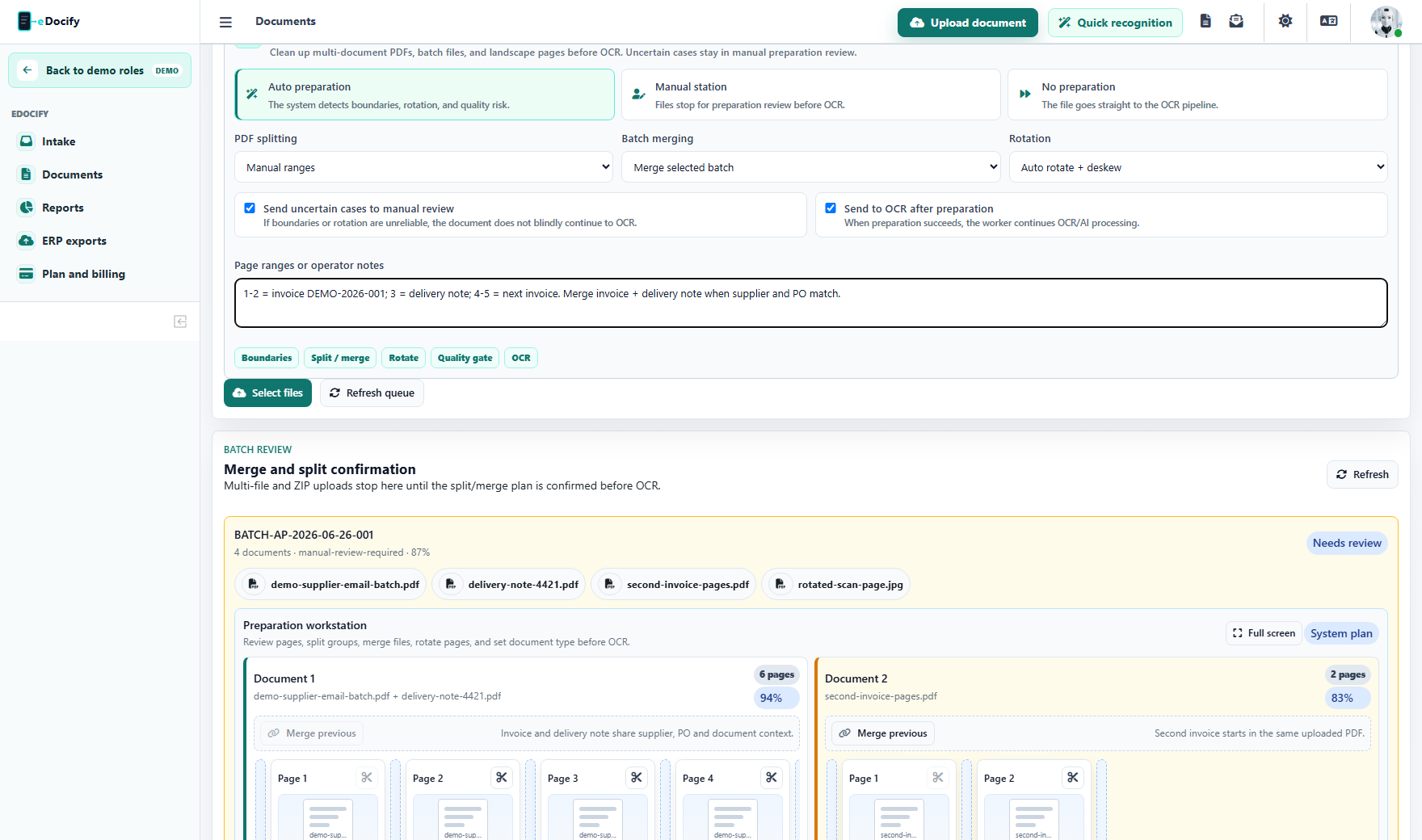
Preparation actions:
- split before page;
- merge with previous document lane;
- rotate selected page;
- remove selected page;
- drag pages between document lanes;
- set page type;
- confirm prepared batch;
- expand to full-screen mode for large batches.
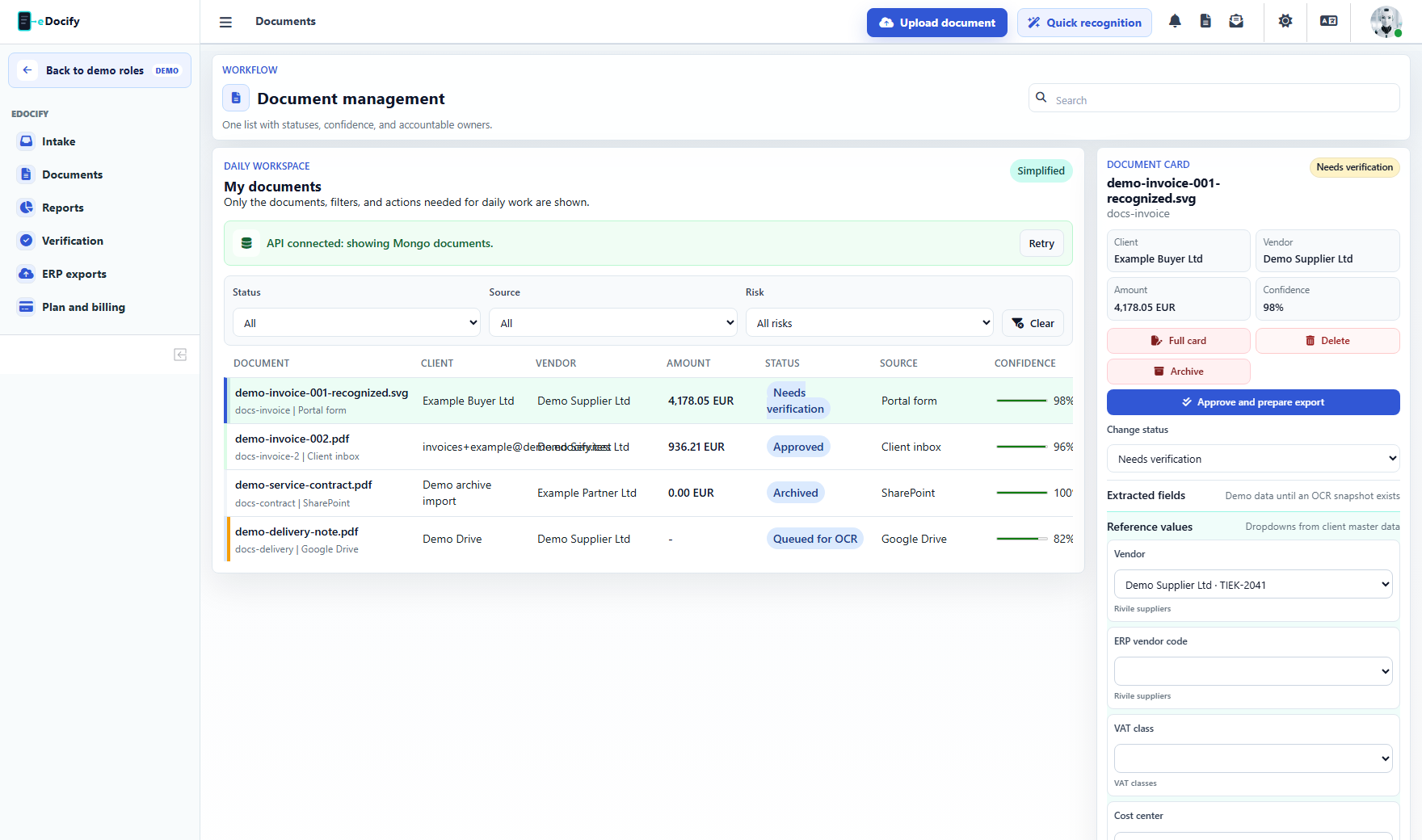
Document list
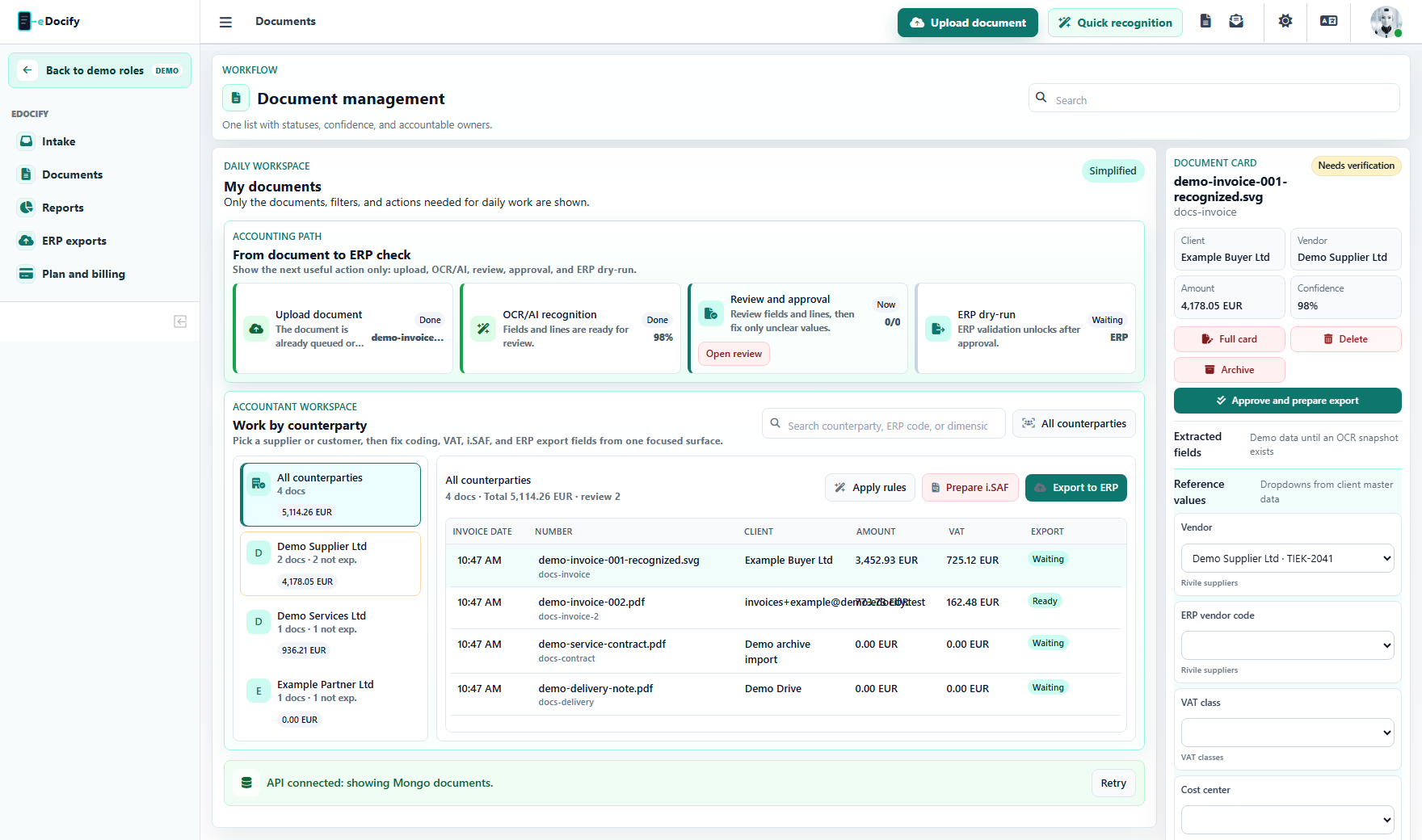
Document list coverage:
| Area | Documentation requirement |
|---|---|
| Saved views | All, approvals, ERP ready, exceptions, integrations, duplicates. |
| Filters | Search, status, risk, source, OCR/AI profile, document type. |
| Columns | User can save visible columns, order, density, and status colors. |
| Bulk actions | Mass edit, AI processing, archive, export, delete. |
| Counterparty view | Supplier/customer context, rules, i.SAF/export preparation. |
| Dead-letter queue | Failed OCR/export jobs, retry, dismiss, open related document. |
Document card
Document card actions that must be explained:
- run OCR/AI processing;
- select or open document in verification;
- delete document when allowed;
- archive document;
- approve document;
- dry-run ERP export;
- export to ERP;
- retry or cancel export job;
- dispatch notifications;
- download approval evidence;
- open mapping issue source;
- save fields and retry export.
Verification Workbench action coverage
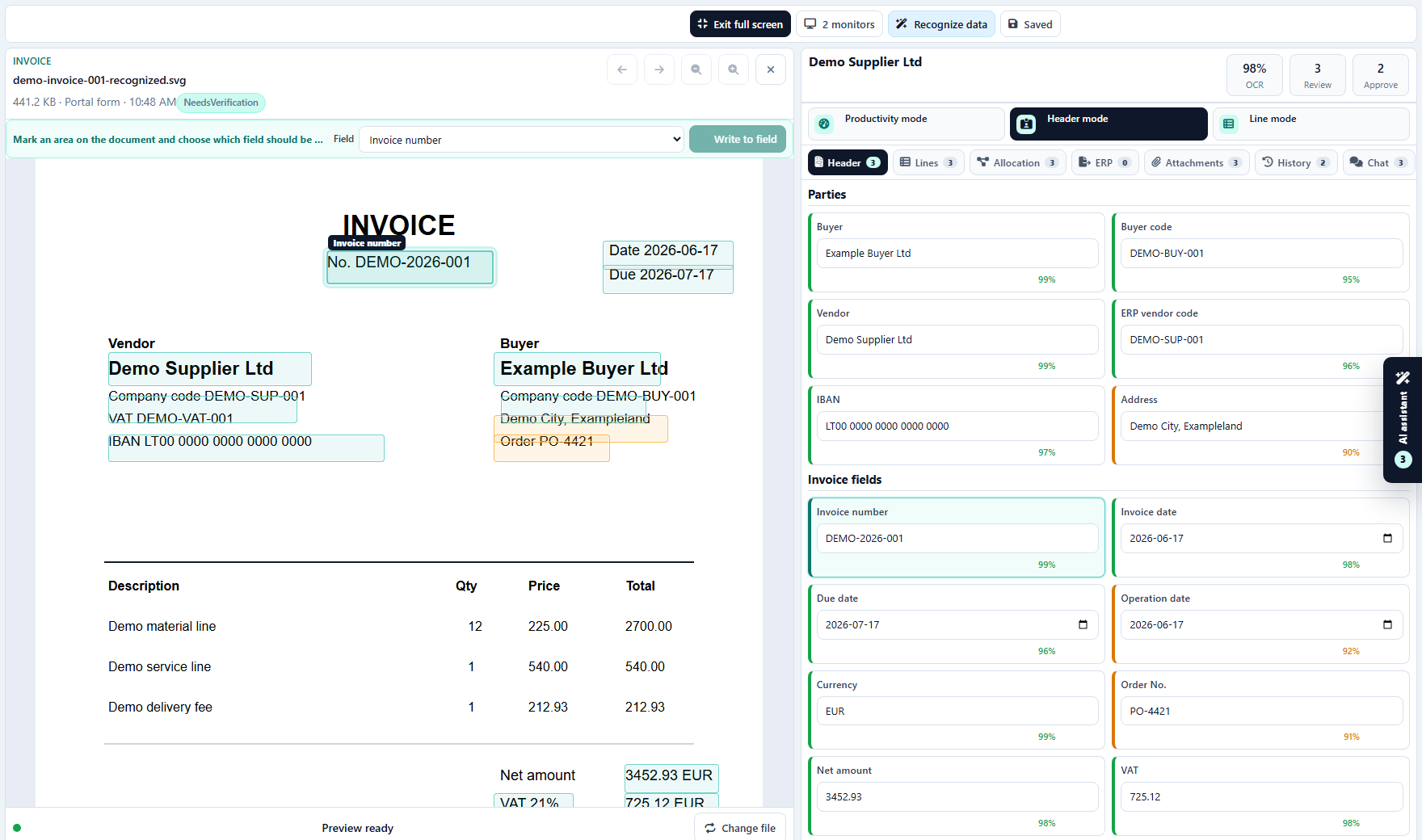
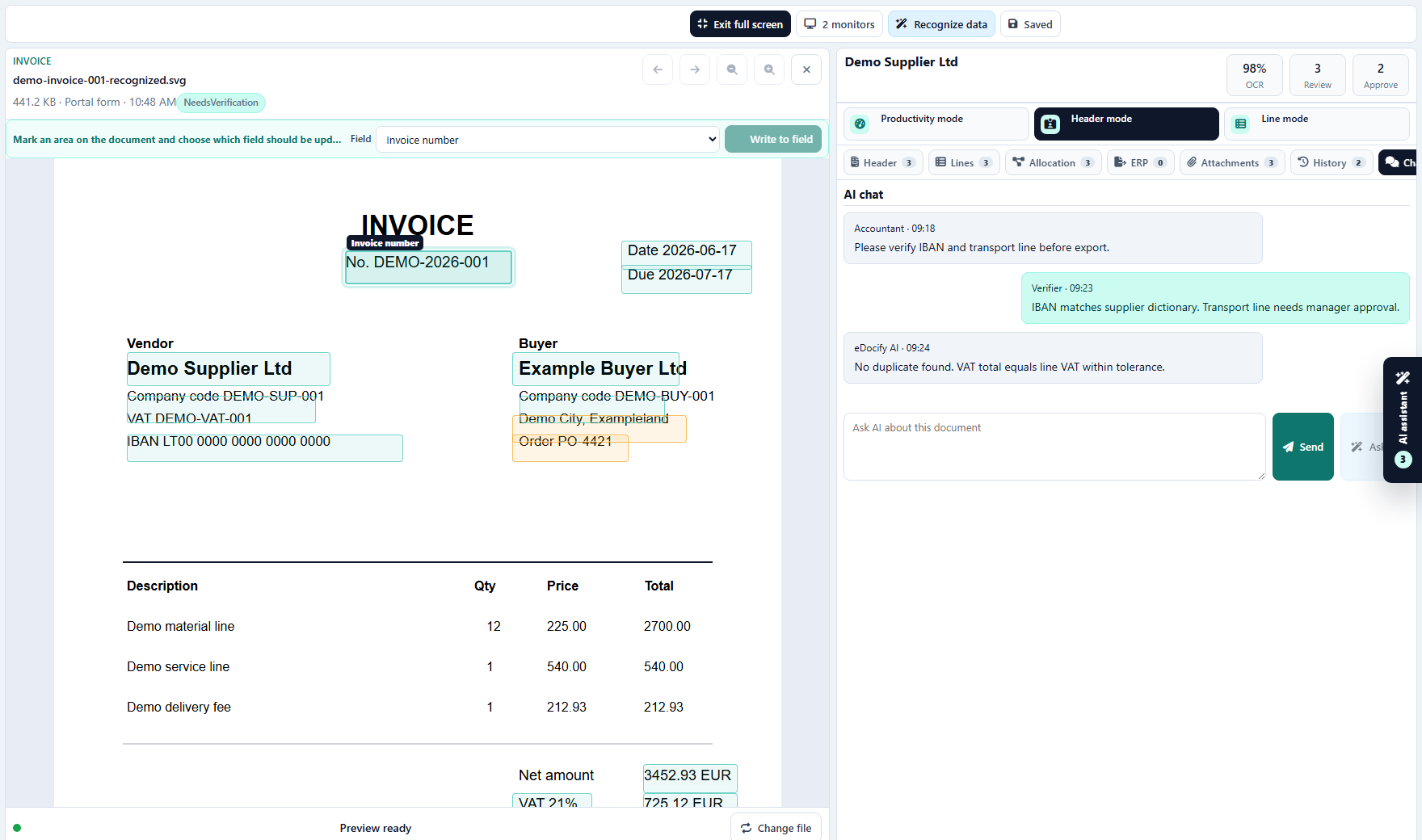
The professional workbench has three work modes:
| Mode | Purpose |
|---|---|
| Productivity mode | Default focus queue, confidence heatmap, QA state, hotkeys, performance signals. |
| Header mode | Invoice or document-level fields with confidence, validation, and lookup suggestions. |
| Line mode | Line item verification, paging, row actions, bulk accept, line-level approvals. |
Tabs:
| Tab | Purpose |
|---|---|
| Header | Buyer, vendor, invoice number, dates, totals, IBAN, currency, required fields. |
| Lines | Line item table with quantity, price, VAT, total, codes, cost center, project, approver. |
| Allocation | Dimensions, cost centers, project split, routing and accounting dimensions. |
| ERP | Export dry-run, mapping issues, payload status, retry and cancel actions. |
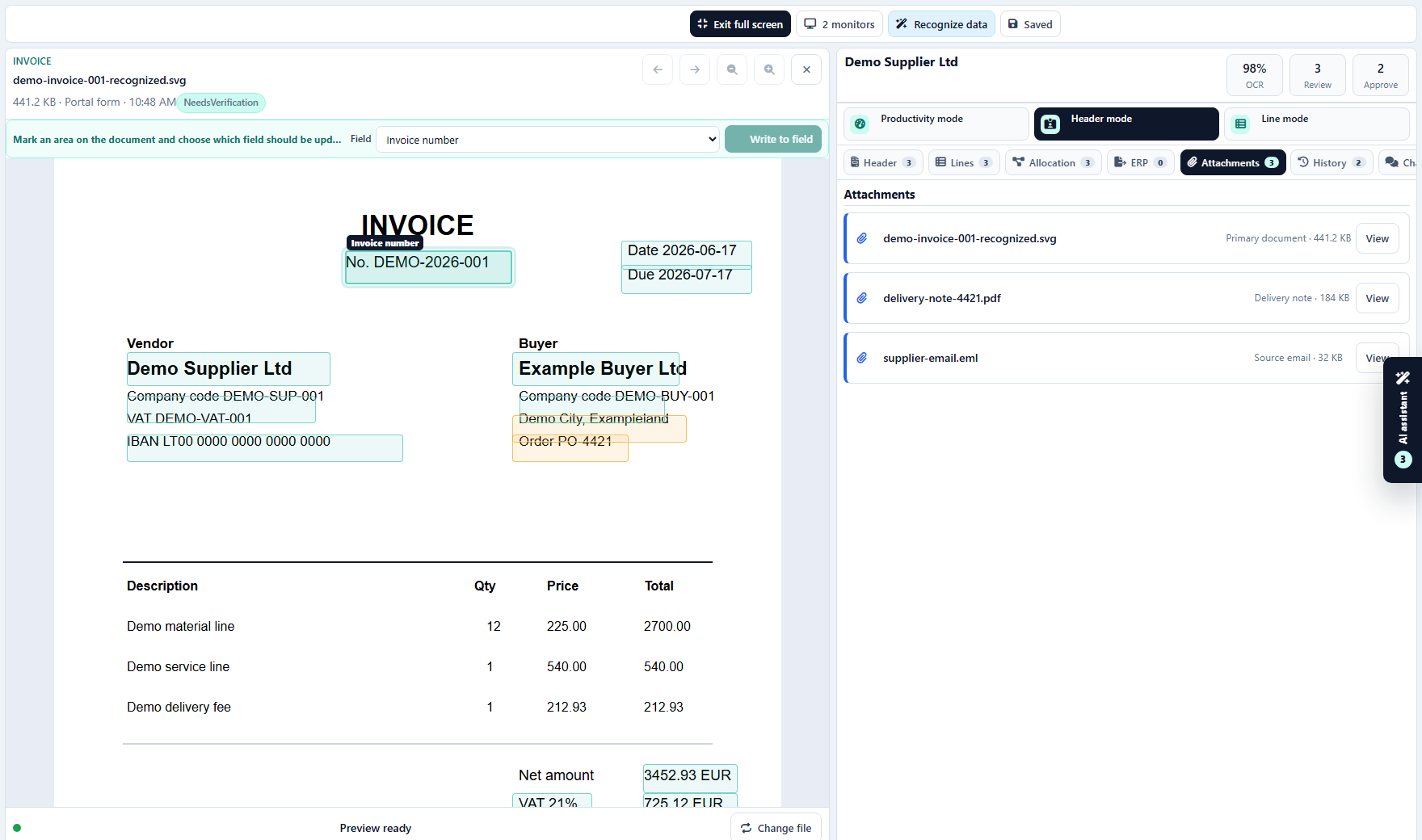
| Attachments | Email, delivery notes, purchase orders, exported payloads, supporting files. |
| History | Backend status, user actions, lock events, field changes, export events. |
| Chat | Document conversation between accountant, verifier, approver, and AI. |
| AI | AI suggestions, commands, checks, and assistant actions. |
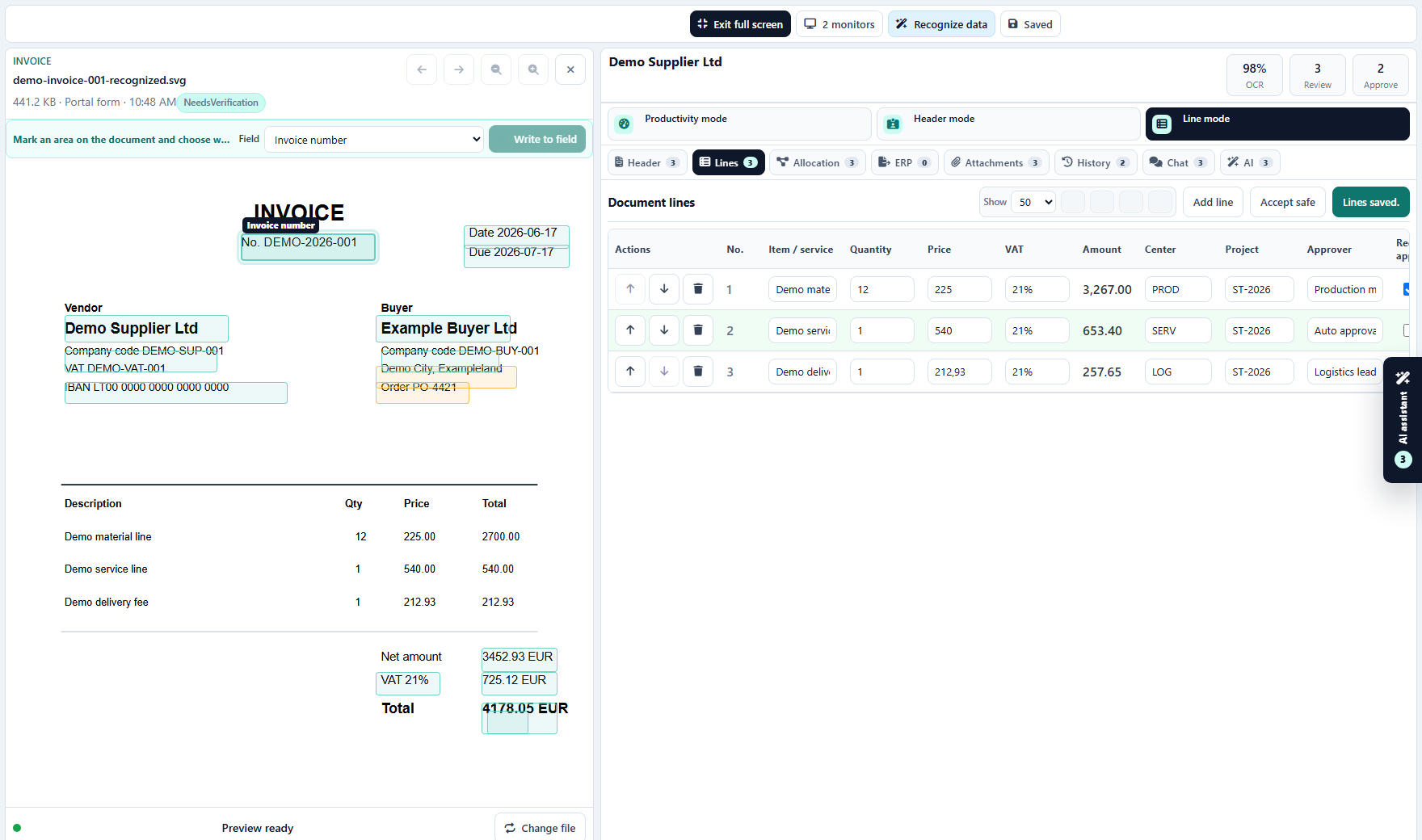
Line mode actions:
- first, previous, next, and last page;
- add line;
- move line up or down;
- remove line;
- accept all safe lines;
- save line items;
- focus line and highlight its document zone;
- assign line approver;
- bind project or cost center from reference lists.
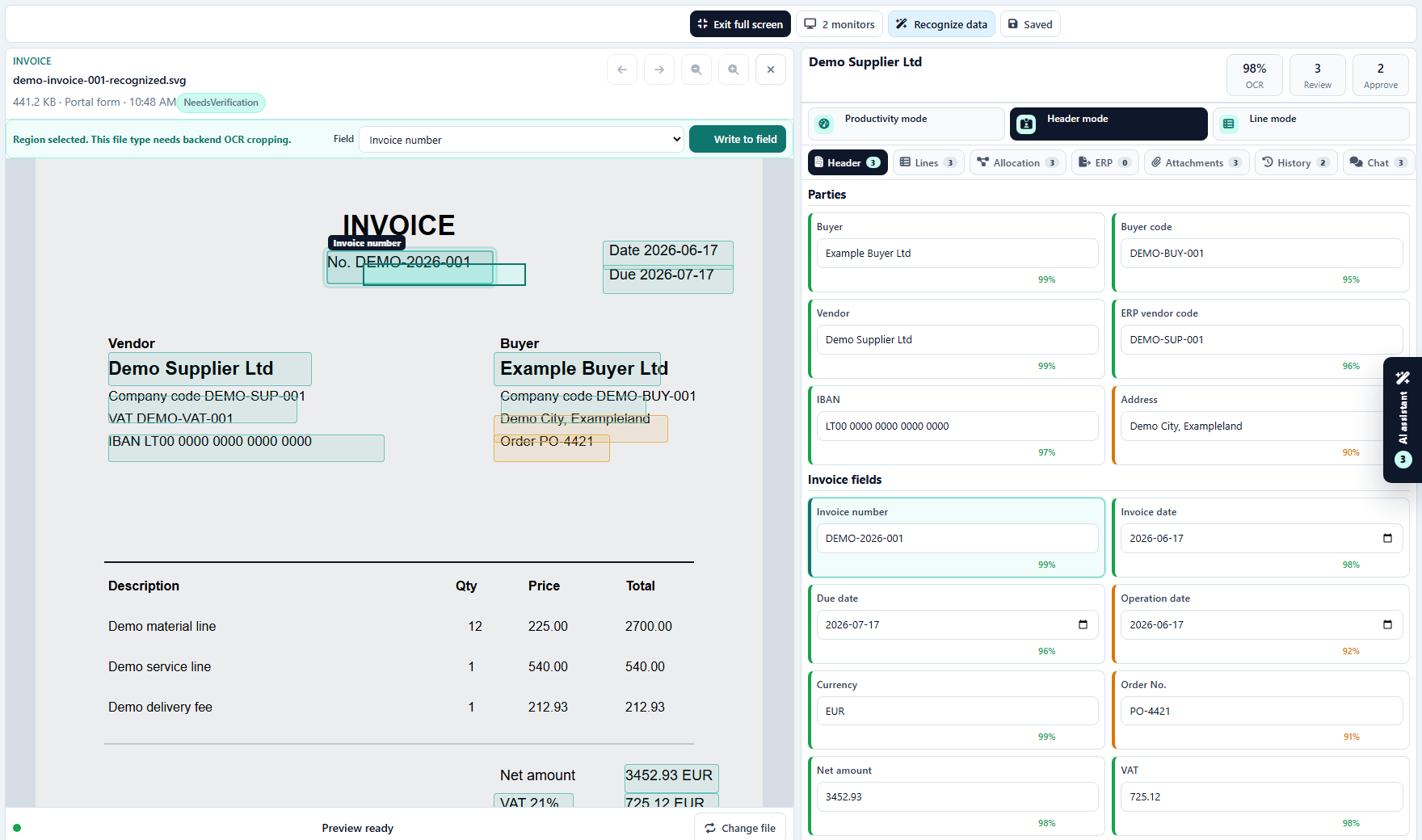
Region OCR actions:
- mark an area on the document;
- choose a target field;
- write recognized text into the selected field;
- keep region coordinates stable after zoom;
- record the region update in history.
Enterprise IDP / OCR Operations action coverage
IDP uses the same core intake, document, verification, and export modules, but with a document-factory mindset:
- large queue visibility;
- provider routing;
- OCR/AI benchmark;
- verifier team workload;
- QA sampling;
- four-eyes review;
- exception classification;
- release-gated recognition improvements.
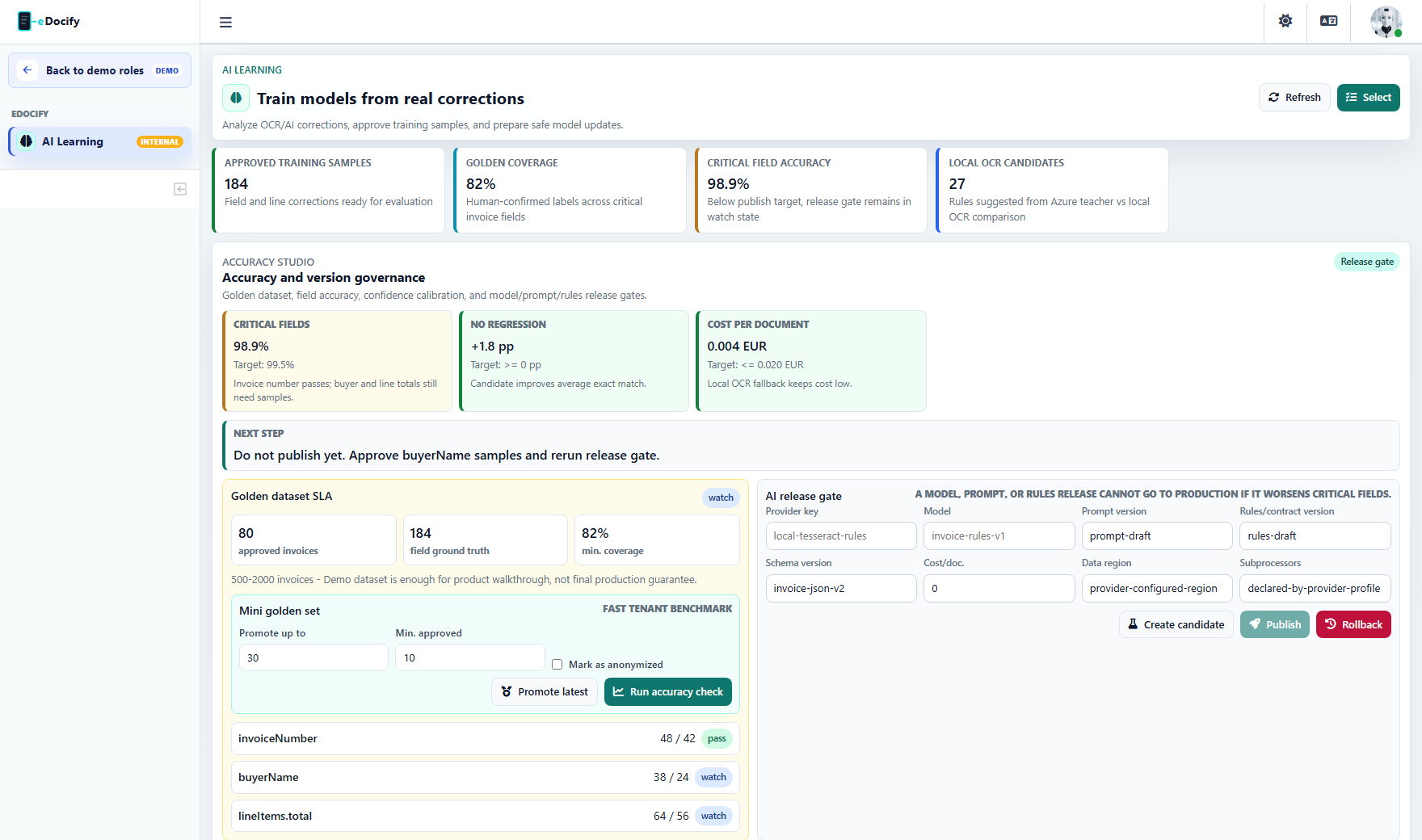
AI Learning actions:
| Action | Expected result |
|---|---|
| Refresh dashboard | Reloads real samples, provider metrics, and OCR history coverage. |
| Select pending samples | Filters samples that need approval or exclusion. |
| Promote mini-golden samples | Moves approved corrections into a small controlled benchmark set. |
| Run mini-golden accuracy | Compares provider/model/rule performance on the controlled set. |
| Create release candidate | Creates candidate version for model, prompt, provider route, or rules. |
| Publish release candidate | Promotes candidate when release gate passes. |
| Rollback release | Restores previous approved version. |
| Approve selected | Marks selected samples as usable training/evaluation data. |
| Exclude selected | Removes noisy or invalid samples from learning. |
| Export preview | Creates exportable benchmark/training preview. |
E-document Archive action coverage
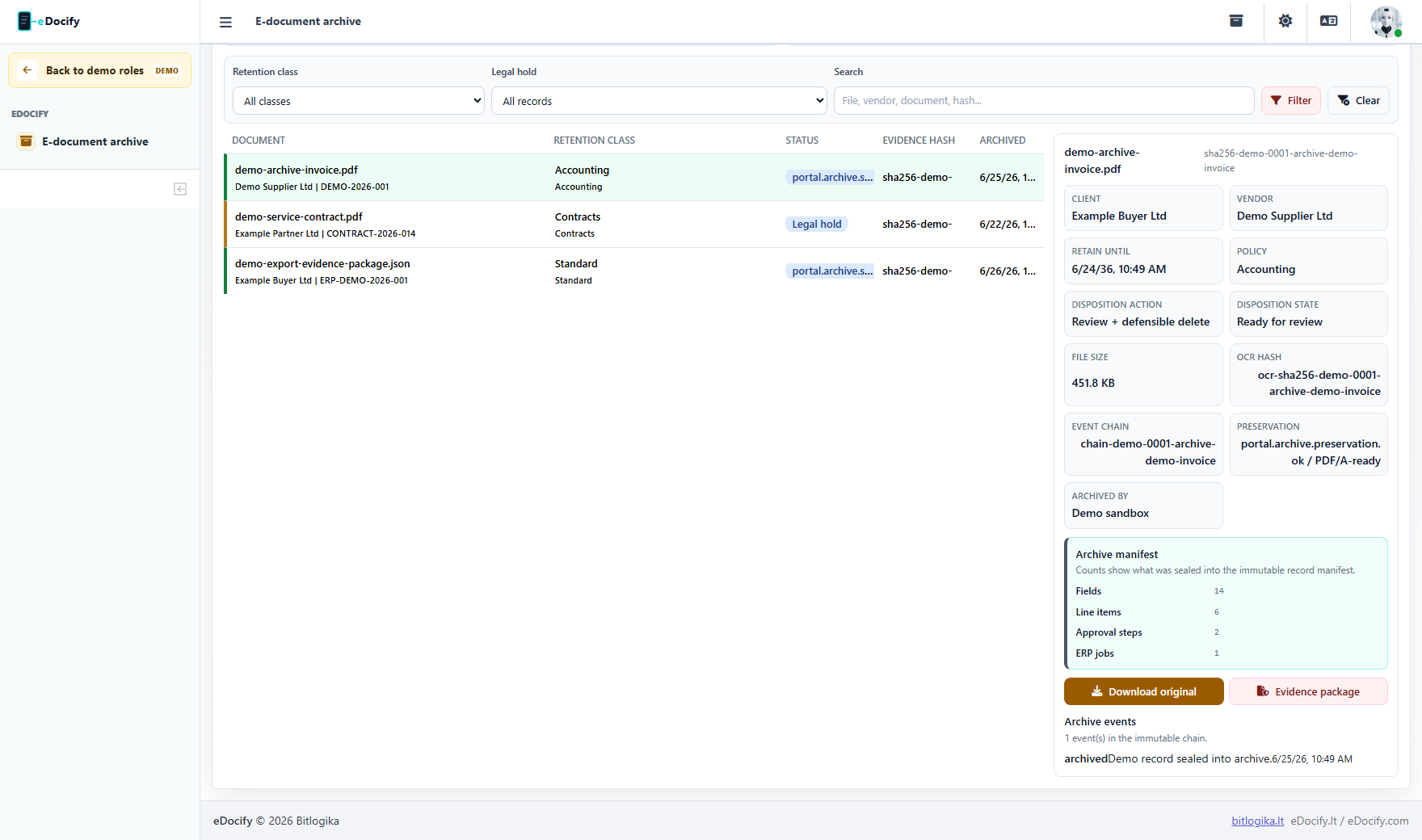
Archive coverage:
| Area | Documentation requirement |
|---|---|
| Archive search | Search, date range, record type, retention class, legal hold, tags, source. |
| Record detail | Metadata, original file, OCR text, hash, evidence chain, events. |
| Legal hold | Place or release legal hold with reason and audit trail. |
| Retention | Review disposition, defer deletion, approve retention action. |
| Evidence package | Download audit-ready evidence package. |
| Archive reports | Retention, preservation, legal hold, source volume, disposition queue. |
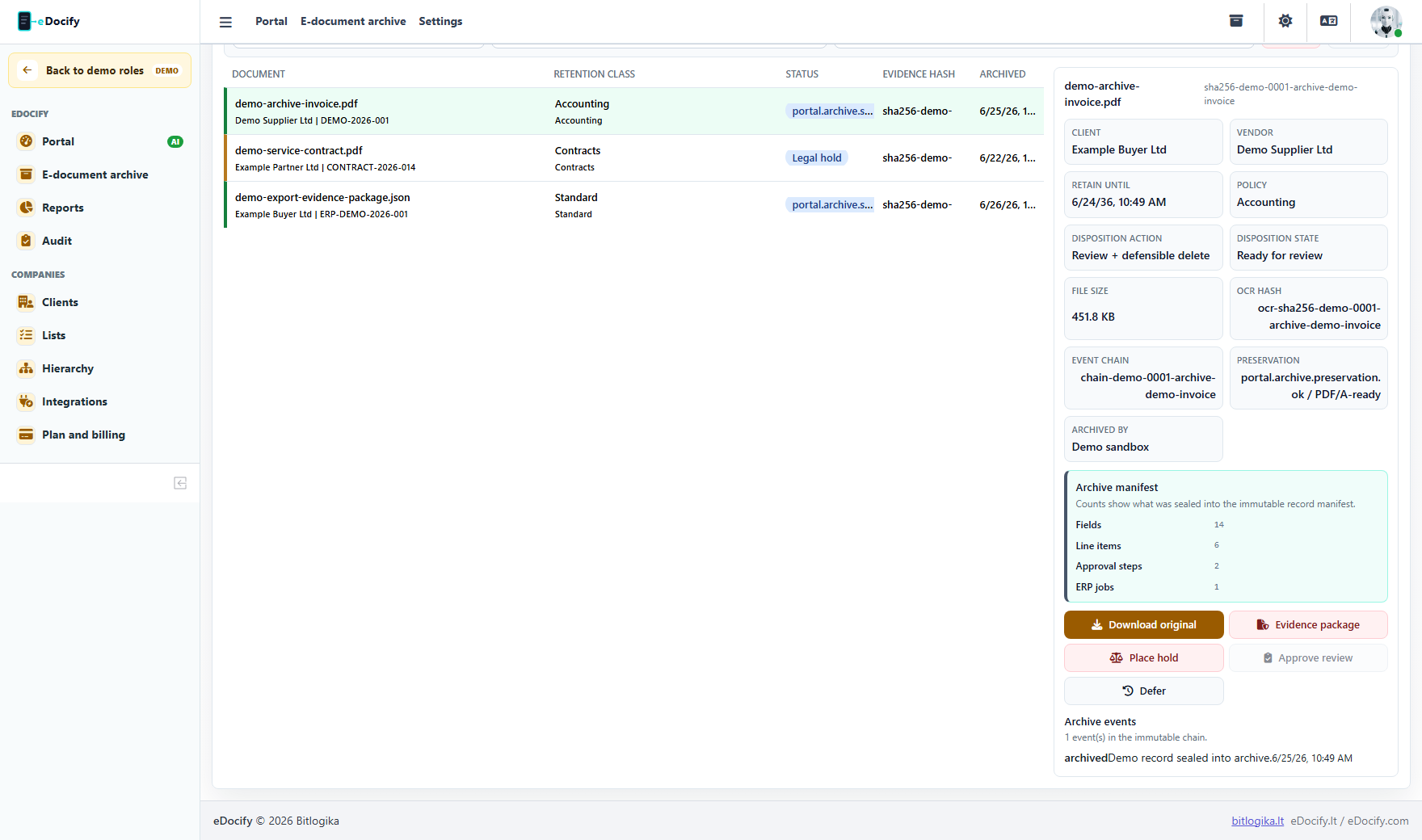
Archive actions:
- select archive record;
- download original file;
- download evidence package;
- toggle legal hold;
- review disposition;
- defer disposition;
- open source document if linked;
- clear filters;
- apply archive filters.
Configuration and administration actions
Client profiles and document fields
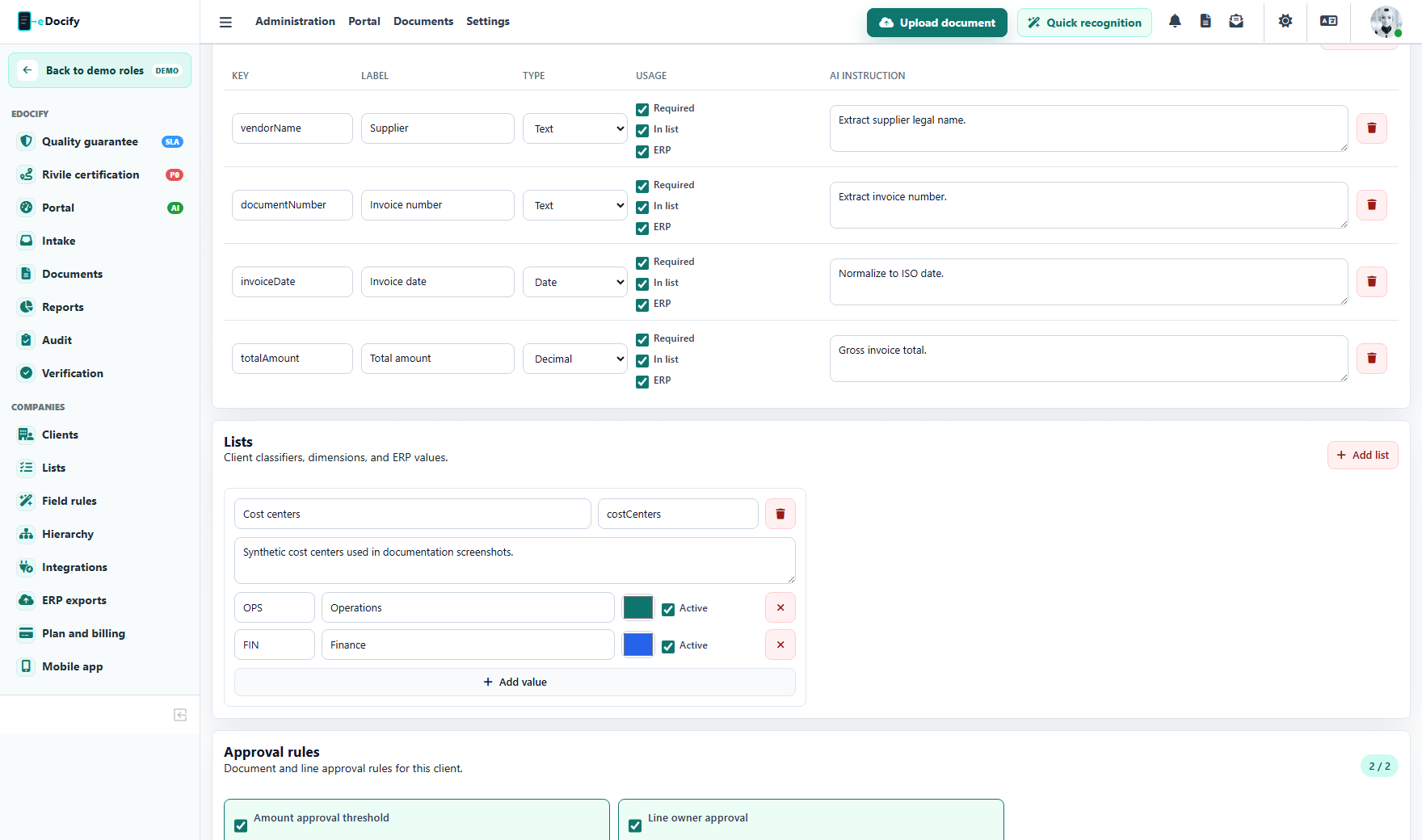
Actions:
- reload client profile workspace;
- select client profile;
- edit profile name, key, document type, ERP profile, OCR/AI provider;
- add or remove document fields;
- add or remove profile lists;
- add or remove list items;
- save profile;
- configure line-level approval availability.
Lists and lookup sources
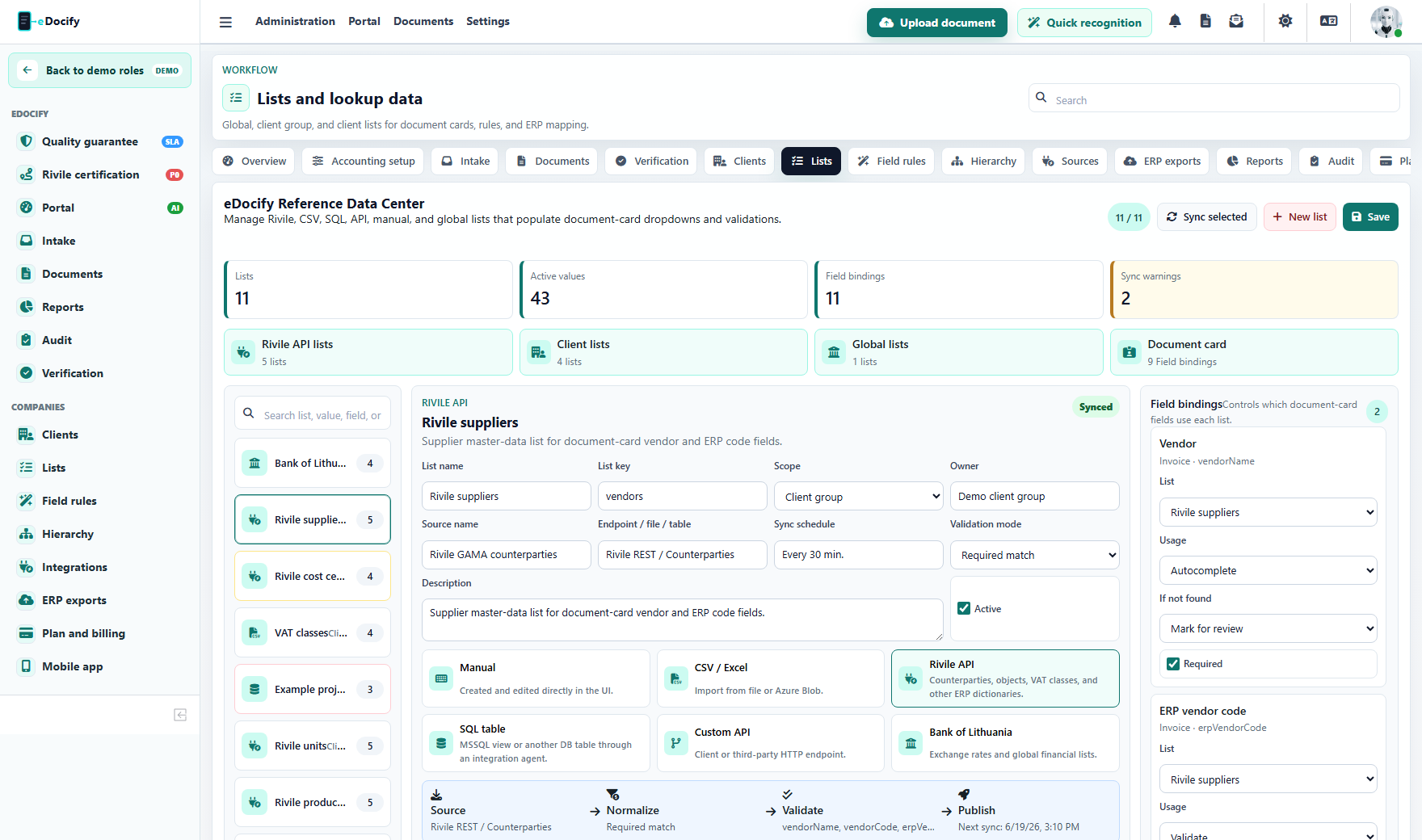
List sources:
- manual;
- CSV;
- Rivile API;
- SQL table;
- custom API;
- Bank of Lithuania currency rates.
Actions:
- sync list;
- add list;
- select list;
- save list configuration;
- add list item;
- remove list item;
- bind list to document field;
- use list in verification dropdowns and validation.
Field Processing Studio
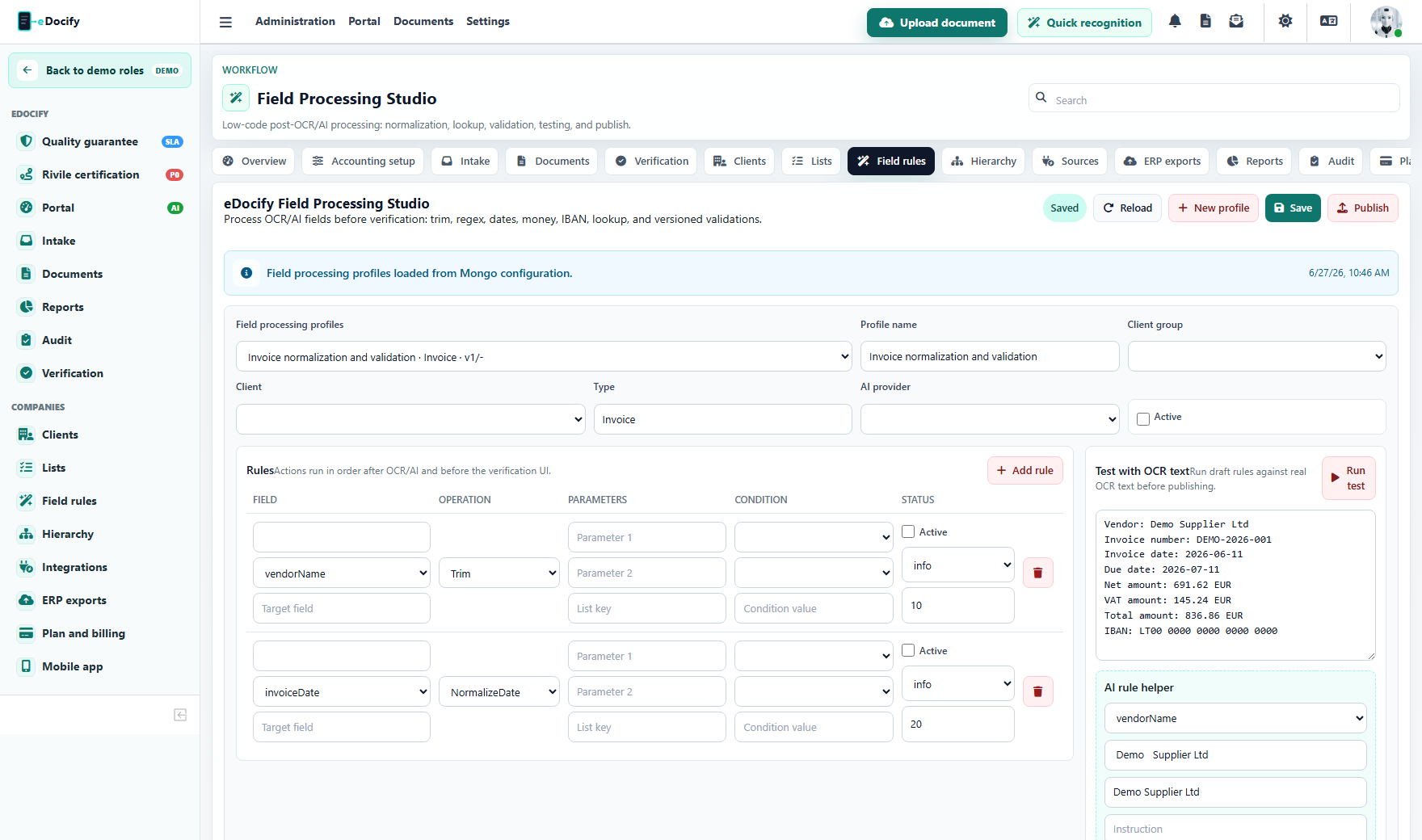
Actions:
- create profile;
- save draft;
- add rule;
- remove rule;
- run test with OCR text;
- ask AI to suggest a rule;
- publish profile;
- rollback version.
Rule operations to document:
- trim;
- replace;
- regex replace;
- substring;
- split;
- concat;
- normalize date;
- normalize amount;
- normalize IBAN;
- lookup enrichment;
- conditional validation.
Export center
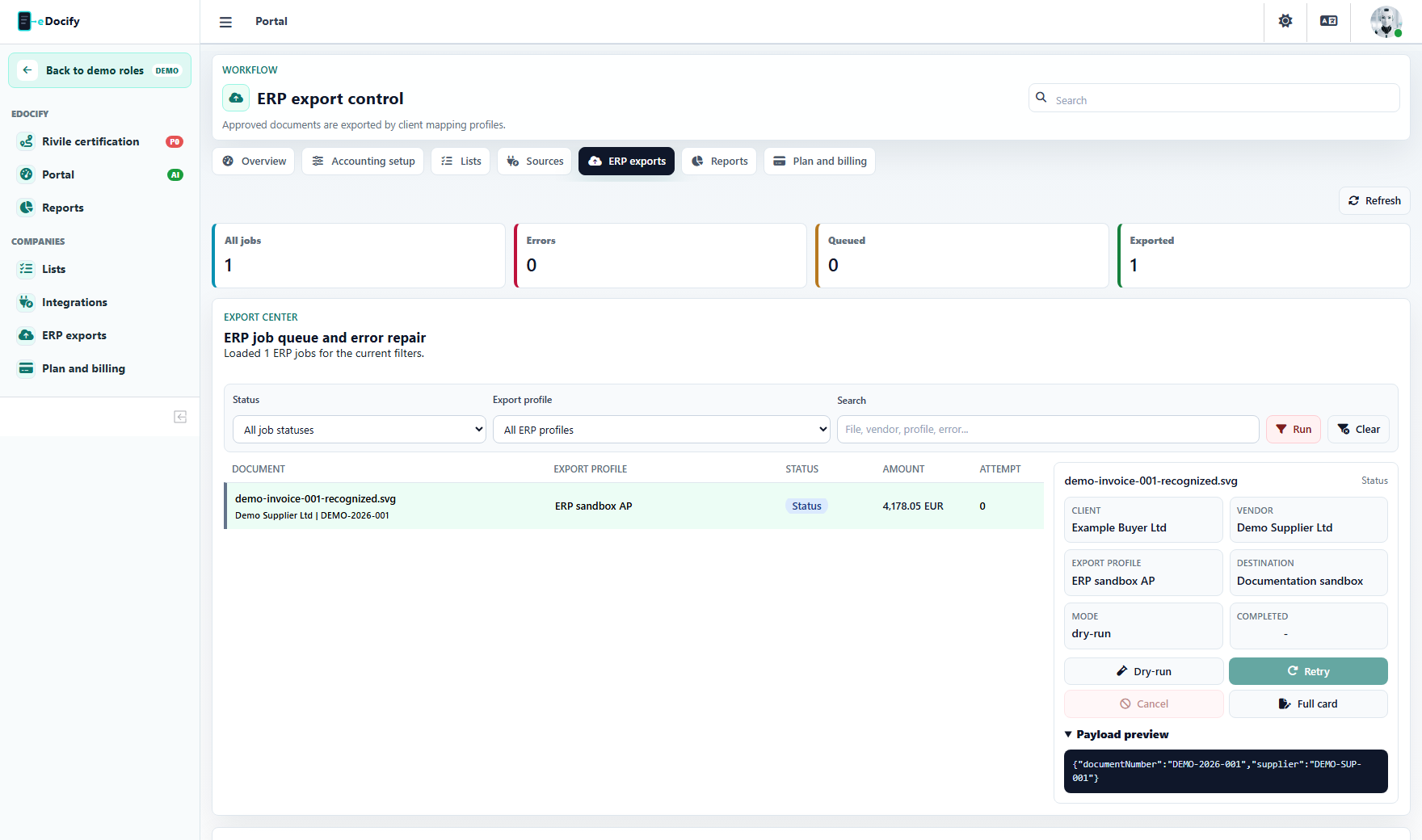
Export actions:
- filter export jobs;
- select job;
- inspect payload and errors;
- repair mapping;
- save repair and retry;
- run dry-run;
- retry failed job;
- cancel active job;
- open related document.
Reports, audit, and billing actions
Reports
Reports use time range, dimension, and metric filters. Product-specific reports should avoid mixing unrelated product semantics:
- Accounting: documents received, verification throughput, approvals, ERP export, exceptions, supplier trends.
- IDP: provider accuracy, verifier productivity, QA sampling, SLA, field/line corrections.
- Archive: retention, legal hold, evidence downloads, disposition queue, preservation status.
Audit
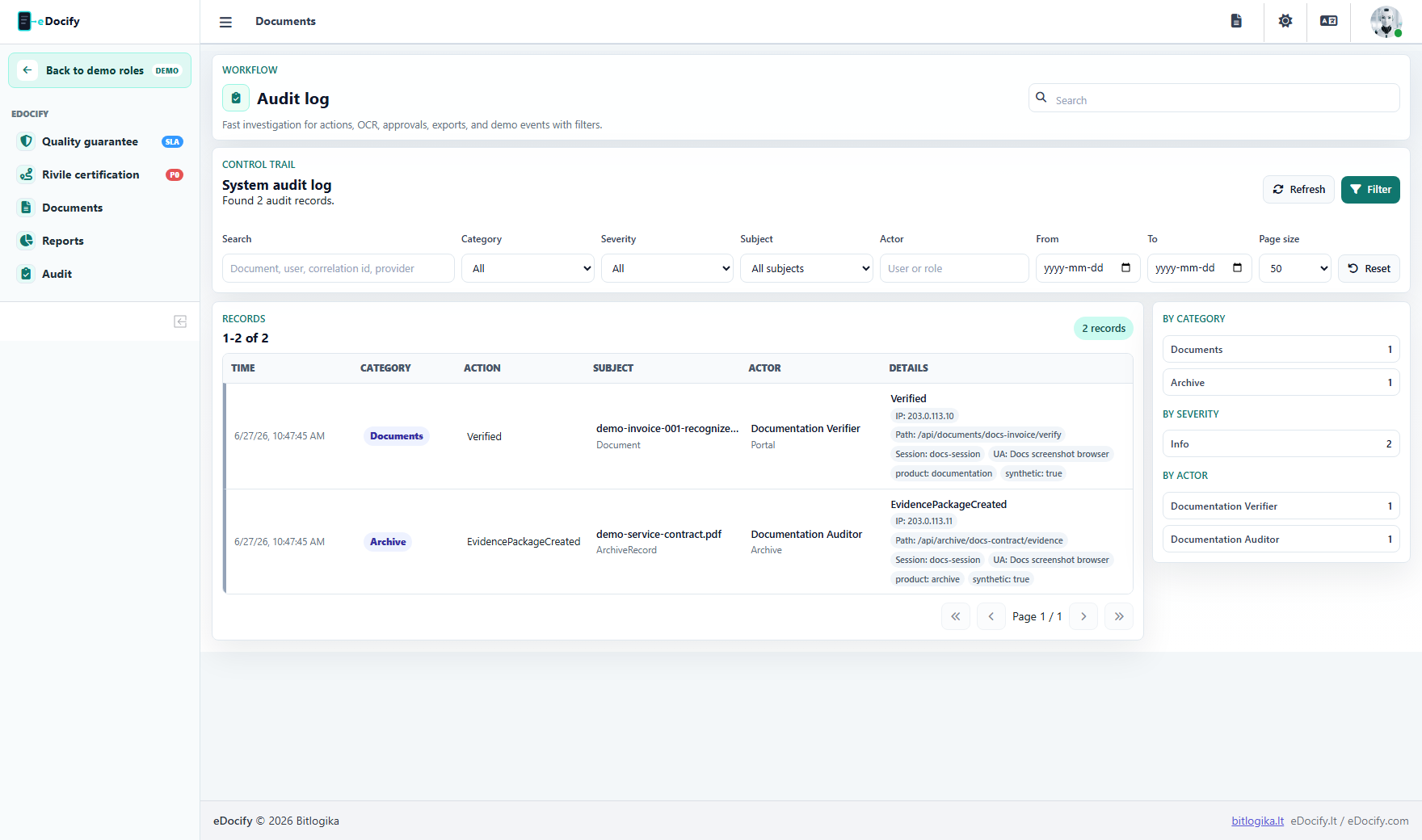
Audit filters:
- category;
- severity;
- actor;
- subject type;
- tenant/client/company;
- date range;
- page size;
- quick filter chips.
Audit categories:
- document;
- intake;
- queue;
- OCR;
- AI;
- verification;
- approval;
- export;
- notification;
- demo;
- learning.
Billing
Billing actions:
- view current product subscription;
- update payment method;
- set default payment method;
- request plan change;
- request billing details update;
- request cancellation;
- download invoice.
Billing documentation must be product-aware. Accounting, IDP, and Archive plans should not look like one mixed pricing table inside a customer workspace.
Documentation coverage checklist
Every new screen or button should be documented with this checklist:
| Check | Required documentation |
|---|---|
| Product scope | Which product owns the feature and whether it is shared. |
| Role scope | Which roles can see and execute the action. |
| Menu route | Which menu item, tab, or route opens it. |
| Main action | What happens after the click and what backend state changes. |
| Audit trail | Which event is written and which identifiers are captured. |
| Failure behavior | Retry, cancel, validation, dead-letter, or visible error state. |
| Screenshot | Real English UI screenshot from the product-scoped demo session. |
| Regression test | Playwright, backend unit, contract, or smoke test expectation. |
Gaps now covered by this reference
This reference fills the documentation gaps that were not obvious in product pages alone:
- exact role-to-menu boundaries;
- top-bar actions;
- intake item retry, ignore, and reroute;
- document preparation split, merge, rotate, remove, and full-screen;
- document delete, archive, export, and dry-run actions;
- verification mode and tab inventory;
- line-item row actions;
- region OCR into selected fields;
- attachments and document chat;
- AI Learning release controls;
- archive legal hold and evidence package;
- billing and plan actions;
- list source types and lookup binding behavior;
- audit filters and categories.