Enterprise IDP / OCR Operations
Enterprise IDP / OCR Operations is the eDocify product for high-volume document processing teams. It is closer to an ABBYY-style operations center than a simple accounting portal.
Who it is for
- Document centers processing thousands of files per day.
- Companies replacing expensive enterprise OCR tools.
- BPO teams that verify documents for many clients.
- Archives or operations departments that process invoices, logistics documents, IDs, contracts, or freeform files.
- Organizations that need quality guarantees, SLA reporting, and controlled model changes.
Core idea
The product separates heavy document operations from simple accounting work. A professional verifier needs more controls, more shortcuts, more telemetry, and more quality tools than a regular accountant.
Supported workflows
- batch intake and routing;
- split and merge of multi-document files;
- page rotation and preparation;
- OCR provider selection;
- region OCR into selected field;
- line item verification;
- high-volume queue handling;
- reviewer locks and conflict handling;
- four-eyes quality sampling;
- provider benchmark and accuracy release gates;
- export or archive after verification.
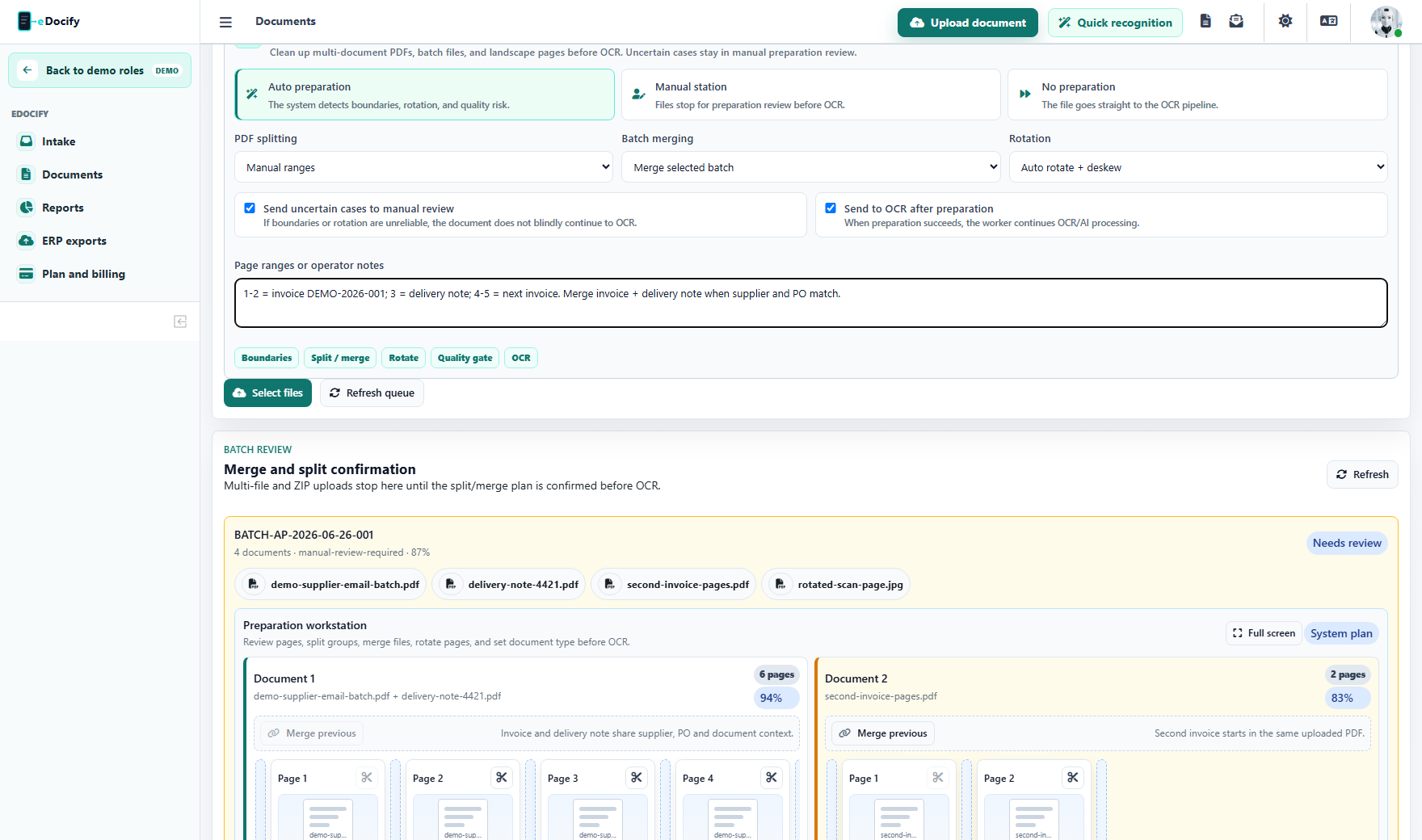
The operations profile treats preparation as a factory step. A scanned batch can contain several invoices, one invoice spread across several files, attachments that must stay with a document, and rotated images. The preparation layer plans split, merge, rotation, deskew, and manual review before the OCR worker consumes the batch.
Verification Workbench
The Verification Workbench is the main screen for IDP operations.
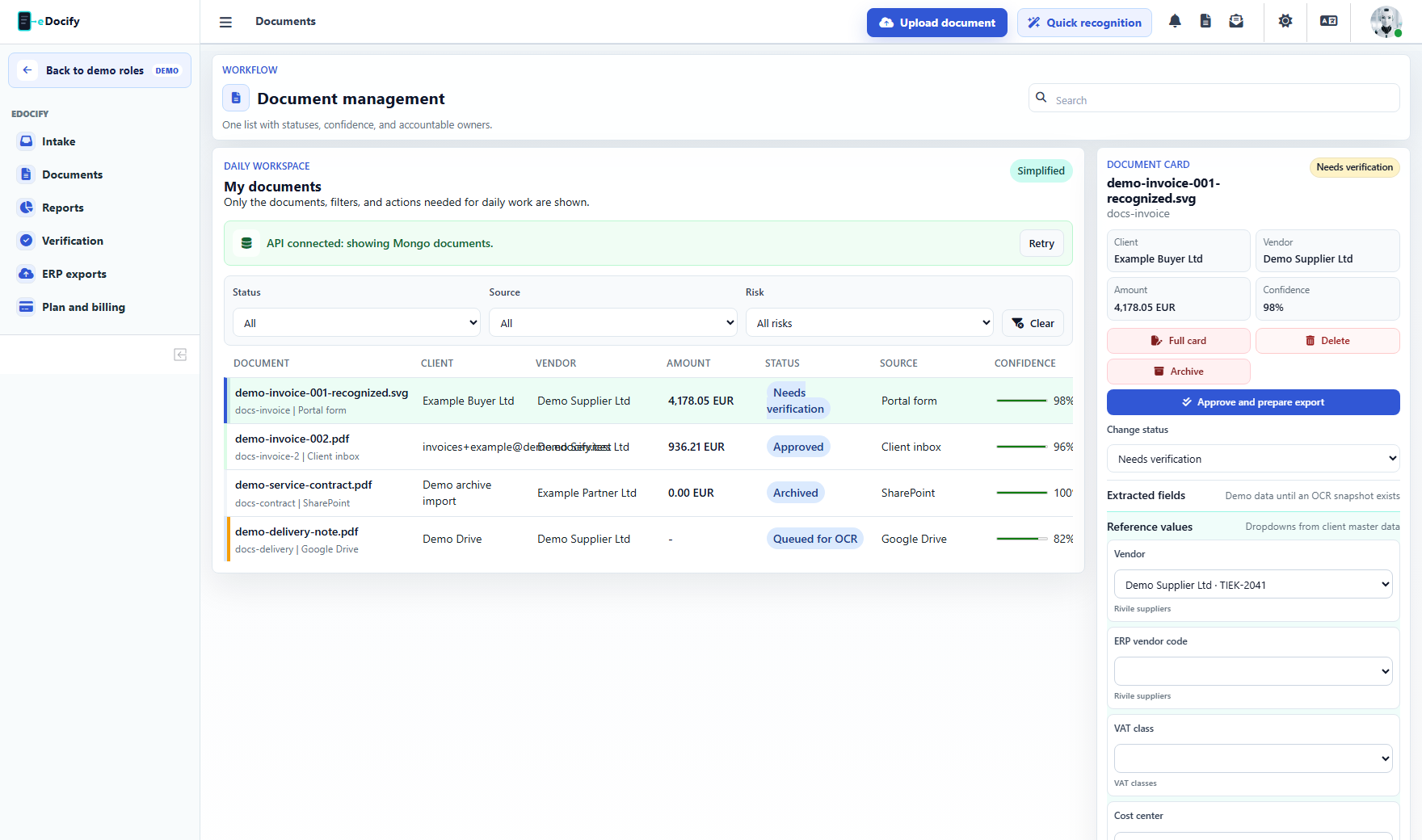
For role-by-role screenshots and menu boundaries, use the IDP / OCR Operations role guide.
Important work modes:
- Productivity mode: first screen for fast navigation, missing fields, confidence heatmap, next field, accept safe fields, and QA signal.
- Header mode: document preview plus header fields such as buyer, supplier, invoice number, dates, VAT, totals, IBAN.
- Lines mode: document preview plus line table, line confidence, line-level approval, row movement, and batch line correction.
- Focus/full-screen mode: hides surrounding navigation and gives maximum space to document plus fields.
- Dual monitor mode: planned operational mode where one monitor shows only document preview and another shows fields or line table.
OCR and AI provider strategy
Enterprise IDP uses multi-engine routing:
- Azure Document Intelligence for strong invoice structure extraction;
- Mistral OCR for document OCR and text extraction;
- OpenAI or Azure OpenAI for structured JSON extraction, verification, and reasoning;
- Local Tesseract, RapidOCR, and PaddleOCR for cost-controlled OCR routes;
- Ollama-hosted Qwen3 experiments for local OCR text-to-JSON schema extraction;
- eDocify Rules for deterministic invoice parsing;
- hybrid BYOK fallback when customer-owned keys should be primary.
Provider routing can be selected per tenant, client group, client, document type, field, or region OCR use case.
Quality Engine
The Quality Engine turns OCR accuracy into a managed product promise.
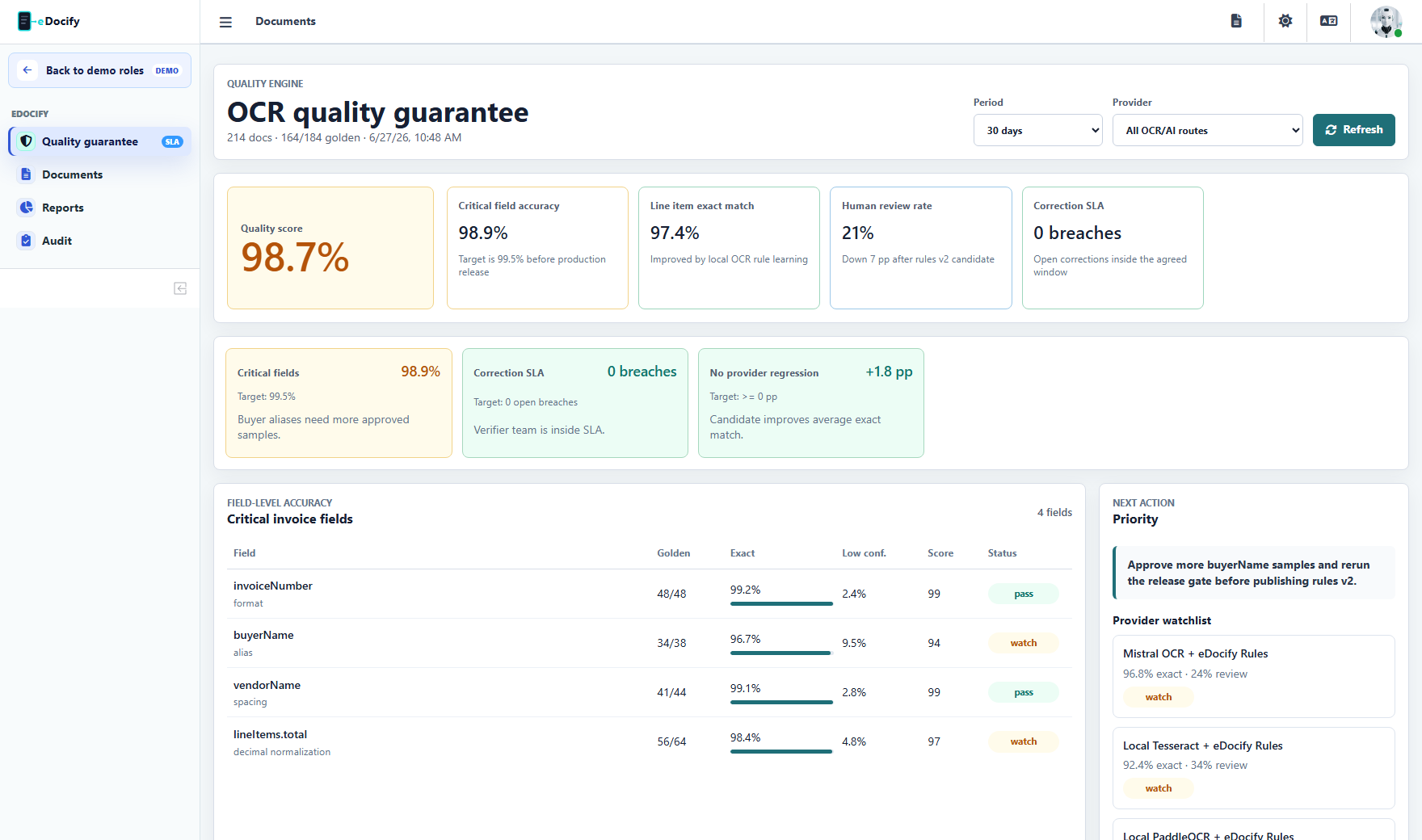
It tracks:
- critical field accuracy;
- field-level precision and recall;
- line item quality;
- review reasons;
- provider benchmark;
- sample size and confidence;
- QA sampling;
- SLA and correction time;
- model, prompt, and rule release risk.
Accuracy Studio
Accuracy Studio should be used when a new provider, prompt, OCR rule, or field processing version is evaluated. A new version should not be published if it reduces critical field quality.
Recommended release gate:
- use a golden dataset;
- run old version and candidate version;
- compare header fields and line items;
- inspect regressions by supplier, document type, and field;
- publish only if quality improves or business tradeoff is approved;
- keep rollback available.
Team metrics
Professional OCR teams need productivity and quality metrics:
- documents per hour;
- touches per document;
- fields corrected per minute;
- first-pass yield;
- low-confidence rate;
- rework rate;
- SLA breach count;
- documents locked by verifier;
- QA failed samples;
- provider cost per document.
Real use cases
Replacing expensive OCR licensing
A company currently using a costly form recognition platform can start with Azure teacher extraction, compare local OCR engines, build golden datasets, and gradually route cheaper documents through local OCR plus rules while keeping high-risk documents on premium providers.
Shared service center
Each business unit has a separate intake route, document type, SLA, verifier queue, and export profile. Team leads see productivity, lock state, exception backlog, and QA sampling results.
Logistics document processing
The same workbench can support invoices, CMR documents, delivery notes, freight forwarder invoices, and supporting attachments. The document type controls fields, validation, and routing.
What makes this enterprise-grade
- reviewer locks with heartbeat;
- multi-engine benchmark;
- field-level provenance;
- line-level verification;
- controlled model governance;
- audit trails;
- SLA dashboards;
- tenant and role isolation;
- data residency and BYOK provider choices.