AI mapping
AI mapping helps create the first version of a source-to-nopCommerce mapping. It is not a replacement for administrator review. The best result comes from AI suggestions plus a short manual validation pass.
Where AI mapping fits
Use AI mapping after the source schema is detected and before the first dry run.
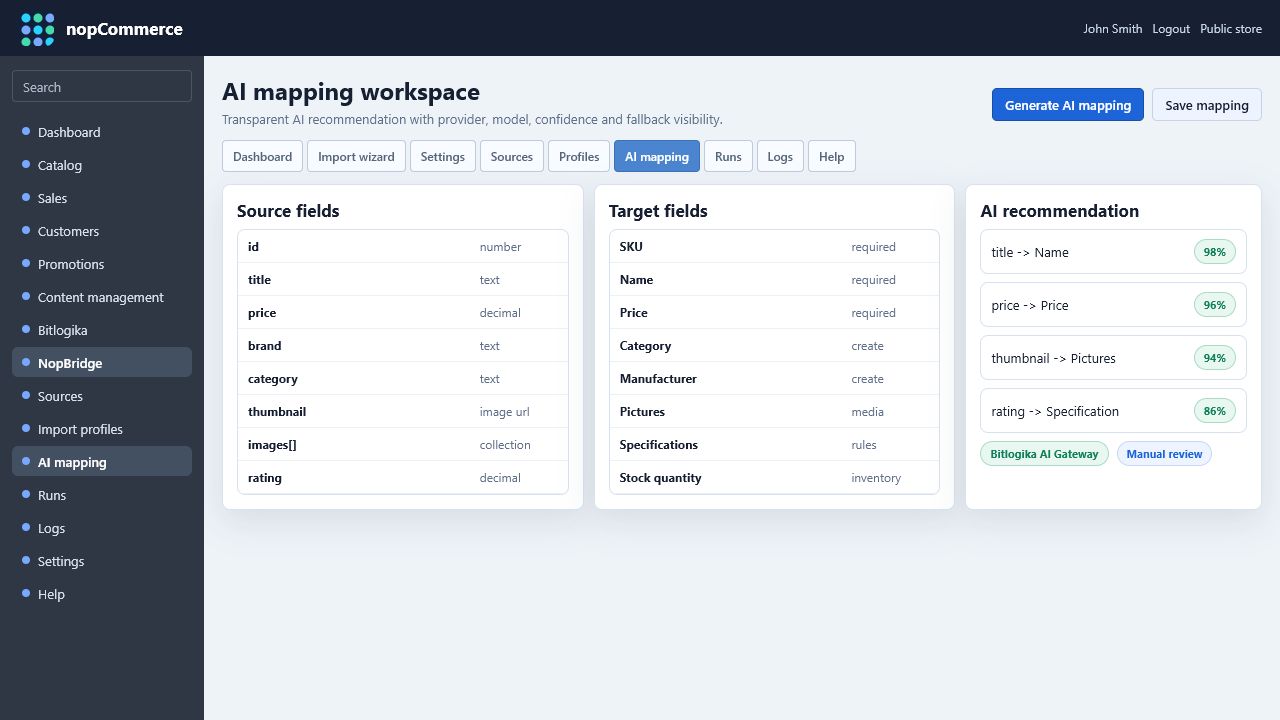
The AI mapper uses:
- Source field names.
- Field types.
- Sample values.
- Target entity type, such as Products or Customers.
- Existing nopCommerce target fields.
Recommended workflow
- Create or test the source.
- Review the typed source schema.
- Open the mapping workflow.
- Select the target entity.
- Generate AI suggestions.
- Review confidence and reasoning.
- Save the mapping.
- Run dry run.
- Adjust any low-confidence fields.
What AI usually maps well
AI mapping is strongest for common fields:
| Source example | Likely target |
|---|---|
sku, itemNo, productCode | Product SKU |
title, name, product_name | Product name |
description, body_html | Full description |
price, sale_price | Price |
brand, manufacturer | Manufacturer |
category, department, taxonomy | Category |
image, imageUrl, images[0] | Product pictures |
color, size, material | Product attributes |
weight, warranty, rating | Specification attributes |
What must be reviewed manually
Always review:
- Fields that look similar but mean different things, such as cost, price, list price, and sale price.
- Category hierarchy rules.
- Attribute versus specification attribute decisions.
- Image source rules.
- Duplicate matching fields.
- Required fields.
- Any field with low AI confidence.
AI result modes
NopBridge can display which engine produced the suggestion:
| Mode | Meaning |
|---|---|
| Bitlogika AI Gateway | The request was processed through the Bitlogika API gateway. |
| Direct OpenAI | A direct configured OpenAI key was used. |
| Heuristic fallback | No AI gateway result was available, so deterministic local rules created a fallback mapping. |
If the UI shows heuristic fallback, treat the mapping as a useful starter only. It can still be helpful, but it is not a real AI response.
Quality checklist
Before real import:
- Every required nopCommerce field has a source or default value.
- SKU or source identity is stable.
- Category mapping creates the expected hierarchy.
- Attributes are separated from specification attributes.
- Image mapping points to the right source: URL, file system, FTP, Drive, or object storage.
- Dry run shows the expected create, update, and skip counts.
- A second dry run does not produce unexpected duplicates.